You’re a graphic designer. You’re super creative. It’s part of the job. But when you’re competing with others who share those skills for the same position, you’re in for a challenge. Your graphic design resume needs to stand out among a sea of similarly talented people; the question is, “How?”.
Yes, it’s tough. But if you want to land your dream job, it’s important to know how to craft the perfect resume. Do you need some tips and tricks, or better yet, some examples and a template? Keep reading.
Why Your Resume Is Important
When you apply for any job, the employer expects you to show off your skills. Your resume is a chance to show potential employers who you are and what you can do. It highlights your skills and professional experience to make an argument on your behalf. This is especially important in creative fields.
Why should someone hire you? This document tells them.
A good resume:
- Shows your skills: It highlights your talents and expertise in graphic design.
- It is easy to update: You can add to your resume over time or edit it to match the job you’re applying for.
- Helps you get an interview: The hiring manager usually sees your resume first. They use it to decide whether you’re worth an interview, so it’s important to get it right!
- Highlights the real you: You’re creative, and your resume can show that, showcasing your versatility as a designer.
If you want to land that job, you need to know the best way to format and write a resume. At the same time, you should make it obvious who you are. It’s a delicate balance, but you can strike it by understanding how to show off your work.

How To Write a Great Resume for Graphic Design: Our Top 6 Tips
Before you start applying to job postings, you need your resume to be airtight. These six steps will help you nail it.
1. Add Your Personal Information
Your resume needs to include your basic information so that employers can contact you. Include:
- Name: Your first and last name go at the top of the document.
- Email address: Directly under your name, write your email address. Make sure it’s an email you use regularly so that you won’t miss a message.
- Phone number: Include your phone number under that. Again, make sure it’s a number you use regularly.
- Online portfolio link: If you have a UX design portfolio, include a link. That way, potential employers can explore your work.
2. Include a Professional Summary or Objective
Include a summary near the top of your resume. This is like a snapshot of yourself and your professional experience. You might also hear this called a resume objective, but the two are slightly different.
A summary should include two to four sentences and detail your professional experiences. An objective, meanwhile, covers your goals and aspirations. Here’s an example:
- Summary: Graphic designer with strong design skills and 5+ years of experience. Passionate about working in marketing, with experience creating infographics, Facebook ads, banner ads, and more. Adept at using Adobe Creative Suite, including Adobe Photoshop and Illustrator.
- Objective: Motivated graphic designer seeking an entry-level UX position. Passionate about UX/UI design, with some experience creating website designs as a student at [University].
The one you choose depends on your skill level and the job you’re applying for. Either way, this is your chance to highlight your professional achievements.
3. Detail Your Work Experience
Later, you can go into more detail about any relevant experience you may have. “Relevant” is a bit tricky. If you’re switching careers or just starting, you might not have a lot to write down.
However, you can include anything that you think might help. For example, you might once have worked on a marketing team doing some graphic design. Now, you’re applying for more UX-heavy roles. You can still include this, though, and use it to highlight how good you are at teamwork and cooperation.
Include start and end dates with each job. That way, employers and hiring managers can see how long you have spent in each role. You should also explain some of the duties you carried out at each one.
4. Add Hard and Soft Skills
It’s absolutely crucial to mention all your relevant UI or UX skills. These can be both hard skills, which you learn from training or experience, or soft skills that you naturally possess. For example, hard skills include being adept at using specific design software. Soft skills include things like leadership, teamwork, and so on.
You can include a skills section that bullet points these in a list. If you have space and want to go into more detail, explain these skills and how you have applied them in previous work.
For a graphic design resume, you might want to consider:
- Design and editing software knowledge
- Artistic skills and creativity
- Detail-oriented
- Organization and time management
- Typography
- Color theory
- Illustration knowledge
Pro tip: Check out the keywords listed in the job description. Each role might be looking for specific skills or experience. So, tailor your resume to the job by including those same keywords in your list of skills.
5. List Your Academic Degrees and Certifications
This section explains the hard skills you have acquired from your education. It might detail academic or vocational degrees, courses, and so on. Most employers prefer designers to have a bachelor’s degree in a field like graphic design, web design, or animation.
You’ll need to write the name of the degree, the institution, the dates you attended, and your grade, where possible.
For certifications, you might also need to add the expiration date.
6. Proofread and Format
Don’t skip the proofreading stage. It’s unprofessional to have a resume littered with spelling and grammar mistakes. So, make sure you review it carefully and double-check the information.
Here are some other tips for formatting:
- Make the font readable, using around ten or 12-point size
- Use a font like Helvetica, Arial, or Times New Roman
- Include plenty of white space to make it scannable
- Move your margin to around 1.5 inches
By the way, the average resume is just 489 words, according to McKinsey. It should be short and fit on one page. So, during your editing, you might need to be ruthless and cut things out. Stick to the things that are most relevant to graphic design and, crucially, the specific job description.

How To List Freelance Graphic Design Work on Resume
Many graphic designers have some experience working as a freelancer. If this is the case, you’ll need to add this to your resume. But you can’t list every single client you’ve worked for, right?
If you want to know how to list freelance graphic design work on a resume, it’s simple. You can just write your position/title, freelance, and how long you’ve been doing it. It might look like this:
Graphic Designer
Freelance | September 2020 – Present
Of course, you’ll want to go into detail. So, in the bullet points below, feel free to highlight some of your top clients.
Furthermore, include a link to your UX portfolio so that hiring managers can get a better look.

Graphic Design Resume Template
These days, a lot of companies use Applicant Tracking Systems (ATS), which means they run your resume through a computer. For this reason, you need one that’s easy to scan, which is why a simple Word document works best.
You can find creative resume templates on Canva, but scanners often throw these out because they can’t detect keywords. So, instead of taking that risk, copy the template below into Microsoft Word and fill in your details.
[First Name] [Last Name], [Degree or Certification]
[Phone Number | [Email address] | [City], [State]
Professional Summary/Objective
[Two to three sentences explaining your prior experience, relevant skills, education, and achievements.]
Experience
[Job Title] | [Dates of employment]
[Company Name] | [City], [State]
- [Job duty. Start with a strong verb and explain what you did and any outcomes]
- [Job duty. Start with a strong verb and explain what you did and any outcomes]
- [Job duty. Start with a strong verb and explain what you did and any outcomes]
[Job Title] | [Dates of employment]
[Company Name] | [City], [State]
- [Job duty. Start with a strong verb and explain what you did and any outcomes]
- [Job duty. Start with a strong verb and explain what you did and any outcomes]
- [Job duty. Start with a strong verb and explain what you did and any outcomes]
Skills
- [Skill]
- [Skill]
- [Skill]
- [Skill]
- [Skill]
Education
[Degree and major] | [Name of school or college]
[Dates] | [Grade]
3 Graphic Design Resume Examples
Seeing some of the best graphic design resume examples might help you to create your own. After all, there’s nothing like some inspiration to get those creative juices flowing! We have found some examples of good CVs and have outlined them below.
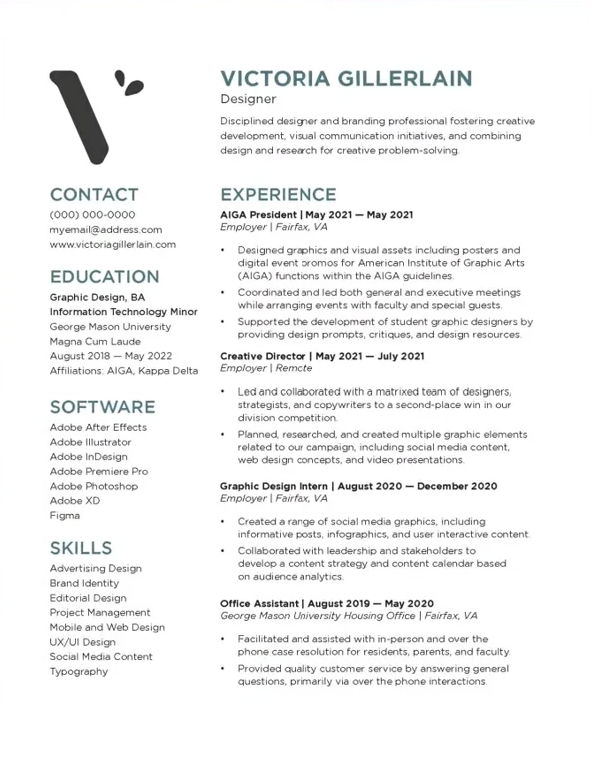
1. Victoria Gillerlain – Using White Space
The best graphic design resumes all make ample use of white space. Your resume is not a creative document.
In fact, the people reading your resume are likely not creatives. They’re hiring managers and recruiters, so they might not appreciate the time you take to make your resume dazzling. Instead, they’ll appreciate something simple and professional.
By the way, notice that Victoria also includes a link to her portfolio, which is where her creativity shines.
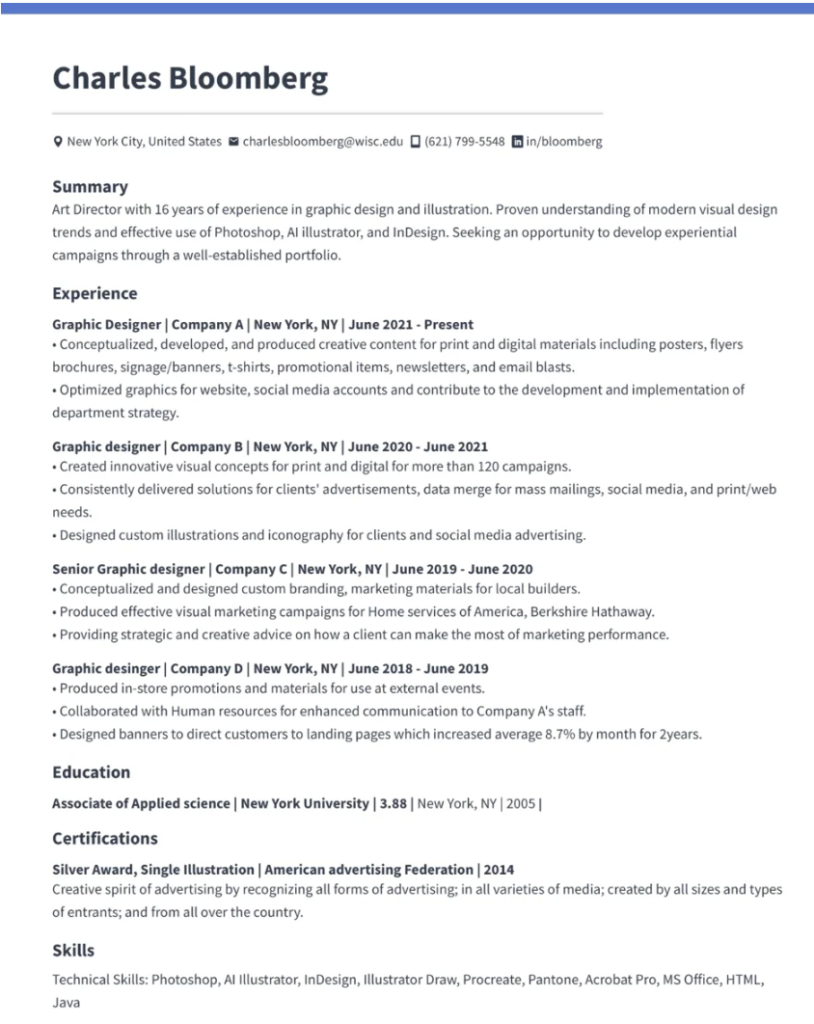
2. Charles Bloomberg – Including Contact Info
Again, you’ll notice that this graphic designer resume example is very clean and simple. It’s to the point, including all relevant information without going into too much detail.
The best part is that Charles’s contact information is all at the top, including a handy link to his LinkedIn profile.
He organizes these with icons. Whether you do this is up to you, but icons can confuse some tracking systems.
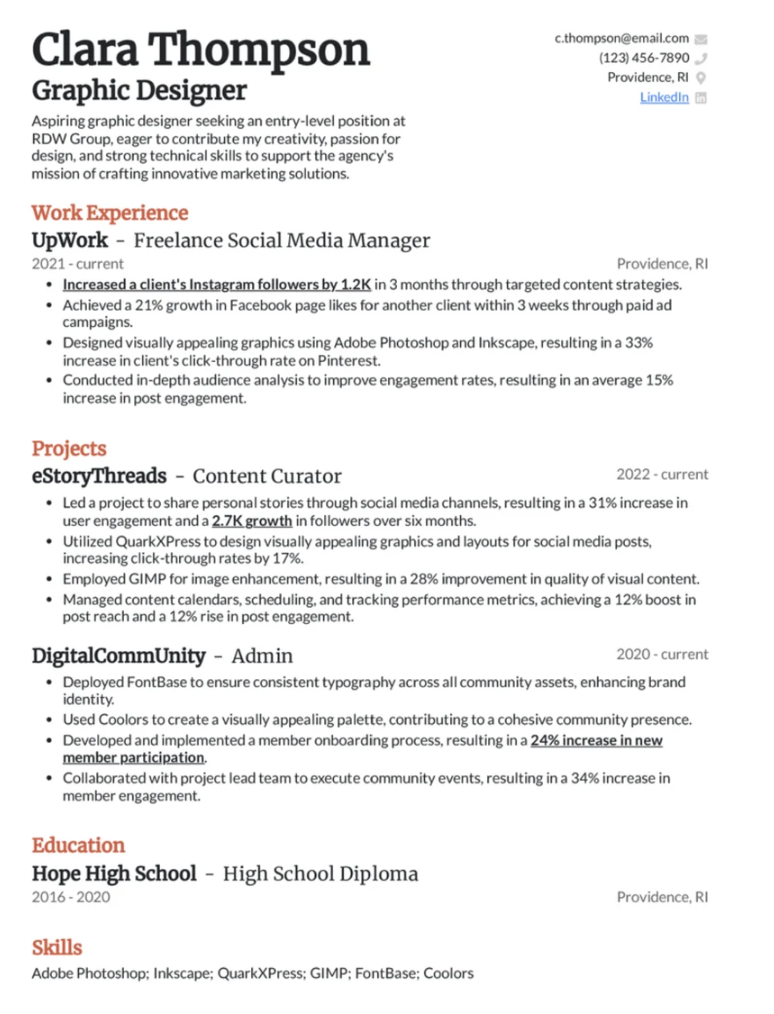
3. Clara Thompson – Adding Color
Just because your resume needs to be professional doesn’t mean it has to be boring. Clara adds a pop of color to the titles, which injects a little personality without being distracting. There’s still plenty of white space.
Another great part about this resume is that Clara highlights her relevant projects before diving into freelance work. It’s a perfect template for those just starting their careers.
Need More Inspiration? Check Out Page Flows!
Now you know how to create an amazing graphic design resume. But you still need experience and a killer portfolio. If you want to learn more about user experience and user engagement, Page Flows is your one-stop shop.
Our library of user flows and graphic design ideas are sure to inspire you. So what are you waiting for? Get started today to see the latest design trends and take your designs to the next level.