If we ask you to picture a color palette, you’ll probably think of those oddly shaped wooden boards. Maybe even Bob Ross.
But today, you won’t find us discussing those types of palettes. You’ll find us answering the question, “What is a color palette in the world of modern UI design?”
Hint: There’s a lot more to it than you think.

So, About The Color Palette(s)…
Let’s dive straight into the brass tacks.
A color palette is a combination of colors used by UI designers when bringing an engaging user interface to life. Typically, a well-defined color palette will include an assortment of the following colors:
- Primary colors, like red, yellow, and blue
- Secondary colors, like orange, purple, and green
- Tertiary colors, like yellow-orange and blue-violet
- Complementary colors, like yellow and purple
- Analogous color schemes like red, red-violet, and red-orange
In UI design, these color combinations help designers evoke particular emotional responses from their users. Color also plays a large role in establishing brand consistency. A common UI design principle, consistency, makes it so that users can easily recognize a brand.
So, ultimately, the types of color palettes a designer uses will have an impact on the user’s overall experience.
It sounds like a lot of pressure just to accommodate the client’s personal preferences, right? Well, not exactly. Designers don’t just consider the personal tastes of their clients – they rely on color theory to guide them.
What Is Color Theory?
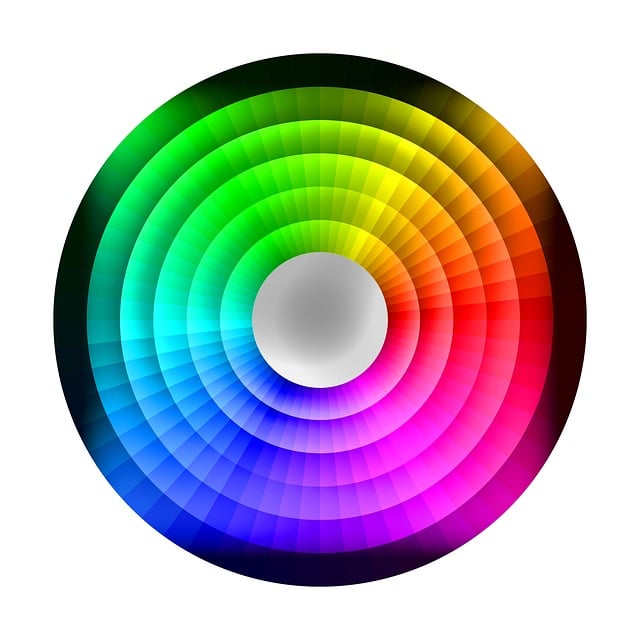
Color theory explores how color can combine to influence our moods and perceptions. In fact, color theory is so perfect for modern product design that you’d think it was a recent concept.
In actuality, color theory’s establishment goes all the way back to 1666, when Sir Isaac Newton invented the color wheel.
Newton’s color wheel still forms the foundation for modern color theory; we’ve just developed it a little more since then.
The original color wheel contains the colors we’ve already discussed – primary, secondary, and tertiary. Now, we use color wheels to chart a color’s hue, tint, shade, tone, and temperature.
The color variants changed the way designers use color theory. In the modern age, these color characteristics help designers create unique color palettes that convey visually pleasing harmony.
Let’s take a closer look at these variants.

1. Hue
In color theory, a hue is a pure pigment. It’s the brightest, most pure version of a single color – one without tint or shade. That’s why many artists and designers consider a hue as the origin of a color.
As an added bonus, hues are easy to spot – any of the six primary and secondary colors are hues.

2. Tint
When you add white to a hue, you get a tint. So, a tint is just a lighter version of any pure color you see in the color wheel.
For example, pink is a tint since that’s what you’ll get if you mix red with white.
3. Shade
If tints make colors lighter, shades are the complete opposite. You create a shade of color when you add black to it to darken it.
Using red as our example again, when you add black to red, you’ll get maroon.
So, maroon is our shade in this instance.

4. Tone
A tone refers to any pure color to which you’ve added an equal mix of white and black. In other words, tones are simply hues that you’ve mixed with a completely neutral gray.
Let’s go back to our trusted red example. Mixing neutral gray with red would result in a color between pink and maroon.
5. Temperature
Check out the following terms:
- Warm colors
- Cool colors
- Neutral colors
Look familiar? Don’t worry if not – those terms simply fall under color temperature.
Color temperature describes the warmth or coolness of a color.
With that in mind, red, orange, and yellow are warm colors. Besides looking cozy, warm colors convey feelings of excitement, joy, and enthusiasm.
On the other hand, green, blue, and purple are cool colors. Instead of energetic emotions, cool colors represent peace, calmness, and comfort.
Any black, white, brown, or gray color you see classes as a neutral color. While neutral colors can symbolize sophistication and reliability, they can also represent boredom.
That’s why many designers usually combine neutral colors with brighter, more vibrant accent colors.
How To Use a Color Wheel: Determine the Best Color Scheme
Now, you know how to understand a color wheel, but do you know how to use a color wheel? That’s the ultimate question.
There are three most common ways you can use the color wheel to determine the ideal color scheme.
Let’s take a look at them.

1. Harmonious Colors
Harmonious colors, or analogous colors, sit beside each other on the color wheel.
By choosing three to five colors that appear next to one another on the color wheel, you can create harmony. Typically, harmonious color schemes never fail to create a sense of balance and are usually the most aesthetically pleasing.
Let’s say that you have a color scheme that consists of these five colors:
- Blue-green
- Blue
- Blue-purple
- Purple
- Red-purple
These colors are an example of a harmonious color scheme.

2. Tonal Colors
Creating tonal color schemes, or monochromatic color schemes, is one of the simplest ways you can use the color wheel.
Imagine splitting the color wheel into slices. Each slice represents a singular color, complete with its various tones. Now, imagine only using the tones within that slice to create a color scheme. That’s an example of you using the color wheel to create a tonal color scheme.
Admittedly, tonal colors do look pretty uniform in practice, but they are great for creating cohesive color palettes.

3. Contrasting Colors
Another way to use the color wheel is to choose colors that sit directly opposite each other on it. These colors contrast with one another. Thus, they are part of a complementary color scheme.
Using contrasting colors like orange and blue or red and green is a great way to create a dramatic look.
What Is a Color Scheme?
With all of this talk of color schemes, you’re probably asking yourself, “What is a color scheme?” It is a combination of colors that designers use for a range of different design projects.
We know what you’re thinking – doesn’t that mean color schemes and color palettes are the same thing? Schemes and palettes actually have different purposes.
A color scheme describes the framework you use to select and combine your colors. However, a color palette refers to the actual colors you use, which you base on your chosen color scheme.
Below, we’ve explored some of the most popular color schemes that designers use.
1. Monochromatic Color Schemes
As you know from our previous section, monochromatic color schemes only use the various tones of one color.
2. Analogous Color Schemes
Another familiar face, analogous color schemes consist of three to five colors, which sit next to each other on the color wheel.
Designers mainly use these color schemes when high contrast isn’t the top priority. They are used for the background of a web page, banners, and basically anything that the user doesn’t need to spot straight away.
3. Complementary Color Schemes
The last of the color schemes we’ve talked about, complementary color schemes use colors that sit opposite one another.
Don’t let its name fool you – complementary color schemes celebrate high contrast and visual prominence. It’s for this reason that designers usually use them for CTA buttons and other crucial information.
4. Split Complementary Color Schemes
This is where we enter uncharted territory, but split complementary color schemes are simple to understand and use.
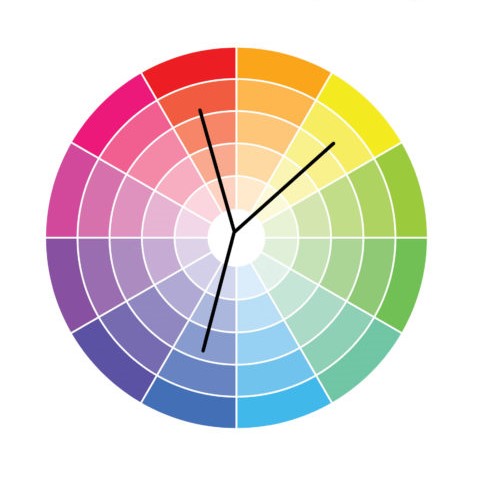
You start by selecting two complementary colors. Then, you choose one of the two complementary colors that you would like to soften. From here, you’d pick the colors that sit on either side of that complementary color.
For example, let’s say you want to use purple and yellow. If you want to soften the yellow, you’d use green and orange in your color scheme. Alternatively, if you want to soften the purple, you’d use red and blue.
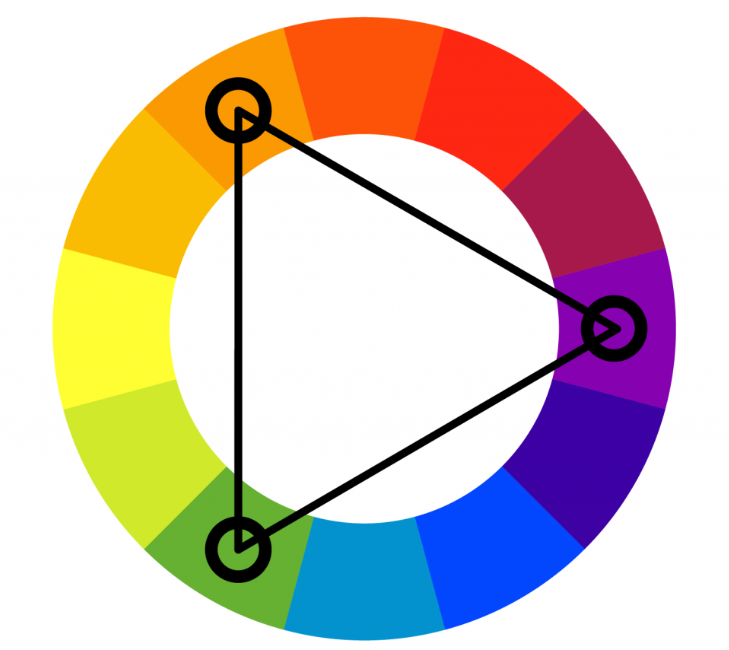
5. Triadic Color Schemes
An easy way to remember how to make triadic color schemes is to think of triangles. Triad, triangles, it works. You simply place an equilateral triangle on the color wheel. Then, pick the three colors that the three corners land on.
A classic example of a triadic color scheme is the three primary colors – red, yellow, and blue.
6. Tetradic Color Schemes
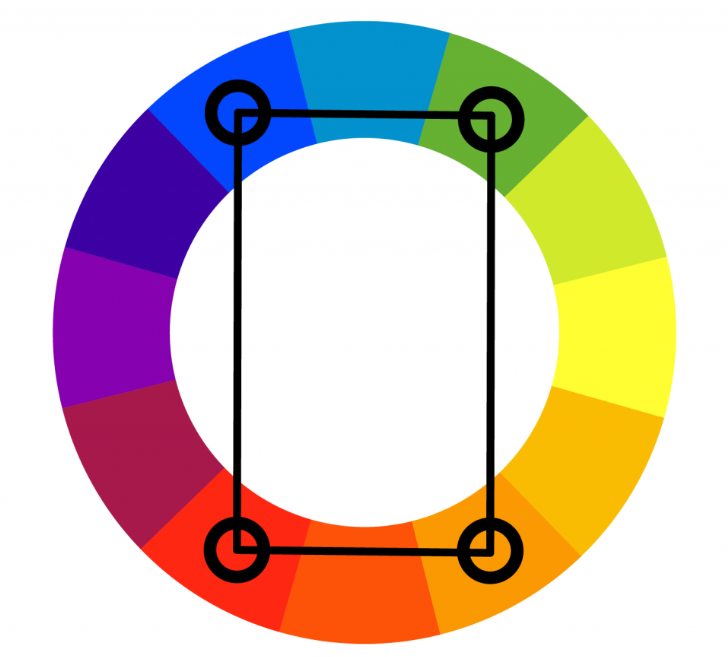
For tetradic color schemes, you start by selecting two pairs of complementary colors. If you were to connect these colors with lines, they would form a rectangle on the color wheel.
This color scheme is a challenge for any designer, especially when it comes to balance. But when the balance is there, these color schemes create gorgeous visual effects.
If you pair purple with yellow and then blue with orange, you’ll end up with a stunning tetradic color scheme.
How To Make a Color Palette
Now, for the fun part. Do you want to know how to make a color palette?
Knowing how to make stunning color palettes is precisely what we’re discussing below.
1. Researching Your Users
What’s UI design without UX research?
Research your users just as you would with any design project, learning their needs, wants, expectations, and pain points. By acquiring your users’ input, you can learn how to tailor the story you want to communicate to their needs.
As a result, you’ll get a better idea of which colors will help you meet and exceed their expectations.
Tip: It can’t hurt to brush up on color psychology, either.
2. Selecting Your Base Color
If your client doesn’t provide color guidelines, there are several things you can do to find your base color. You can start by compiling mood boards to inspire you, consulting your notes on color psychology, and conducting competitor research.
3. Choosing Your Color Scheme
Now, you can choose your color scheme.
Consider any of the schemes we discussed earlier and pick one that meets the users’ needs and the client’s objectives.
4. Adjusting Your Colors
With your scheme in place, you should experiment with color variants.
Try out different tints, tones, and shades to see if you can enhance your color scheme in any way. Remember to consider the client’s goals as you create different iterations of your color scheme.
5. Applying Your Color Palette to Your Designs
Once you’re happy with your palette, you can apply it to your user interface.
We recommend using the 60-30-10 rule. Your dominant color will take up 60% of your interface, your secondary color 30%, and your accent colors 10%.
Then, we suggest that you run some tests on your color palette, recruiting real users to acquire their feedback. From their feedback, you can make any necessary improvements.
The Best Color Combinations That You Should Know
To inspire you, we’ve hand-selected our top picks for the best color combinations below.
- Deep Blue + Pastel Pink
- Forest Green + Moss Green
- Brown + Beige
- Cherry Red + White
- Black + Neon Green
- Purple + Peach
- Dark Green + Light Grey
- Sky Blue + White
Some Color Palette Ideas To Inspire You Further
And here are some excellent color palette ideas, too:
- The Deep Sea: Dark Blue + Navy Blue + Blue + Baby Blue
- Cotton Candy: White + Pink + Hot Pink + Fuschia
- Nature Lover: Seafoam Green + Cream + Brown + Carafe
- Bright & Bold: Gold + Hot Pink + Neon Green + Aqua
- Royalty: Indigo + Violet + Dark Blue + Purple
What Is a Color Palette? Final Thoughts
Hopefully, you feel more confident about choosing the right colors for your design projects.
We’ve already offered color inspiration, but you’ll need more than that to create compelling digital products. Meet Page Flows.
Page Flows is the home of nearly 5,600 recordings and over 90,000 screenshots. But what is it that we document so thoroughly? User flows. These are vital, as without them, your users would navigate your products blindly.
We document user flows from successful products and revered brands like Disney and Booking.com. Why? To help you learn how to enhance your own users’ journeys.
So, let’s say someone asks you, “What is a color palette?” You can say you learned from the people who consistently provide you with valuable inspiration. You can say you took a deep dive into Page Flows.
Get started today to access the secrets to compelling user flows!