Although common and often skimmed over, cookies play a vital role in improving the user’s experience. Cookie messages and privacy policies are also a must-have when it comes to legal compliance.
But despite their mandatory nature, they don’t always have to be a bland blemish on your website’s UI design. So, to help you create an effective cookie banner, we’ll look at the best cookie banner examples in today’s guide.
Once you’ve finished reading our guide, you’ll know how to design an engaging, compliant cookie widget for your website.

Understanding the ‘This Website Uses Cookies’ Message
We’re all familiar with the “this website uses cookies” message. But most of us press the Allow Cookies button without really knowing what we are giving explicit consent to.
Before we look at examples of cookie notices, we need to find out more about these notifications.
So, what are they?
Cookies are small text files containing data that a website stores on your user’s computer upon their first visit.
These small files identify your users’ computers as they use the network, remembering their information and browsing activity.
For web developers, cookies are handy because they make analyzing user behavior and traffic much easier. From this analytical data, developers can improve and personalize the user’s experience.

Cookie Messages and the Issue of Privacy
Since cookies collect your users’ personal data, cookie messages often raise privacy concerns. That’s why every cookie consent pop-up you see will provide users with a detailed privacy policy.
These policies inform users about the types of cookies a website employs and how developers use them. They also detail how users can alter their cookie preferences, allowing them to enable or disable certain cookies.
By providing such policies, you enable your users to make informed choices about their consent preferences.
But a cookie privacy policy doesn’t just benefit the user – it benefits the entire business.
Cookie privacy policies are a legal requirement. The Cookie Law is a privacy law that requires websites to get consent from users before storing/tracking personal data. So, in order to comply with global data protection laws, you must always provide cookie privacy policies.
This is where cookie notification banners enter the picture.
So, What Are Cookie Notification Banners?
Cookie notification banners are popup notifications that allow you to legally and safely obtain your users’ consent for cookies.
There are three things you absolutely need to include in your cookie banners.
1. Details About the Types of Cookies
As we mentioned earlier, there are many different types of cookies. For instance, you can use essential cookies that your website depends on to function correctly. Then, you have functional cookies, which enhance the website’s performance by remembering users’ preferences and cookie settings.
Regardless of the cookie categories you use, you must provide information about the ones your business intends to use. After all, how can your users consent to cookies that they know nothing about?
2. The Ability To Opt Out
Cookie banners must allow users to customize their cookie consent preferences.
There are two forms of consent – explicit and implied.
Implied consent depends on the assumption that the user consents to the use of cookies based on their actions. An example of implied consent is when the user continues to browse after you’ve notified them of your cookie usage.
Explicit consent occurs when your users actively give their consent through their actions. The best example is the simplest – when a user clicks the Accept Cookie button, they give their consent.
However, when your users give their consent, you must always provide an option for them to revoke it. For your users, revoking consent should be as straightforward as giving it in the first place.
3. A Link To Your Privacy Policy
You also need to provide a link to your privacy policy within your cookie banner.
Make it detailed and visible – your users must understand why you require their consent.
Maintaining Compliance: The GDPR Cookie Banner
When looking into privacy laws, you probably came across the General Data Protection Regulation (GDPR).
Although the GDPR is a European Union regulation, it imposes its obligations upon businesses around the world. After all, it’s likely that a large chunk of your user base resides in the EU. So, your cookies will also target EU-based users and must then comply with the GDPR.
To help you stay compliant, we’ve provided a checklist for a GDPR cookie banner.
- Customize your cookie banner to suit your brand’s identity.
- Design a user-friendly UI structure that users can easily navigate across different devices.
- Tell your users about your cookie usage in plain language.
- Implement auto-translated cookie banners in accordance with the user’s language.
- Make it clear which cookie categories your website uses.
- Provide an Accept, Reject, and Cookie Settings button to let your users customize their preferences.
- Automatically block third-party cookies and scripts until the user gives their consent.
- Offer users the option to revoke their consent easily.
- Remember to add a link to your cookie privacy policy.
- Record your users’ consent to evidence your compliance.
Let’s look at a cookie banner example that excels at GDPR compliance.
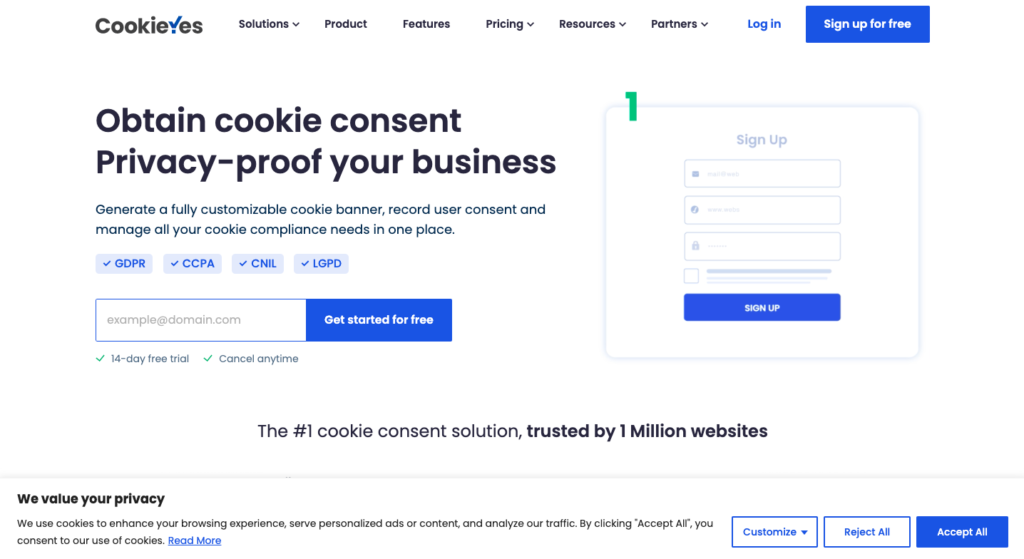
The image above this section is an example of a cookie banner from CookieYes.
As you can see, the banner is visible but not invasive. It also perfectly summarizes, in simple terms, what the user needs to know about cookie usage.
Along with a link to their privacy policy and consent options, CookieYes is a great example of GDPR compliance.
Cookie Banner Policy Examples
Speaking of cookie banner examples, it’s time to look at some of the best.
Let’s start by looking at some cookie banner policy examples.
1. Nestlé
It’s easy to look at several cookie banners and talk about how they’ve added links to their policies. But to maximize the usefulness of these banner links, you need to know what a good privacy policy looks like.
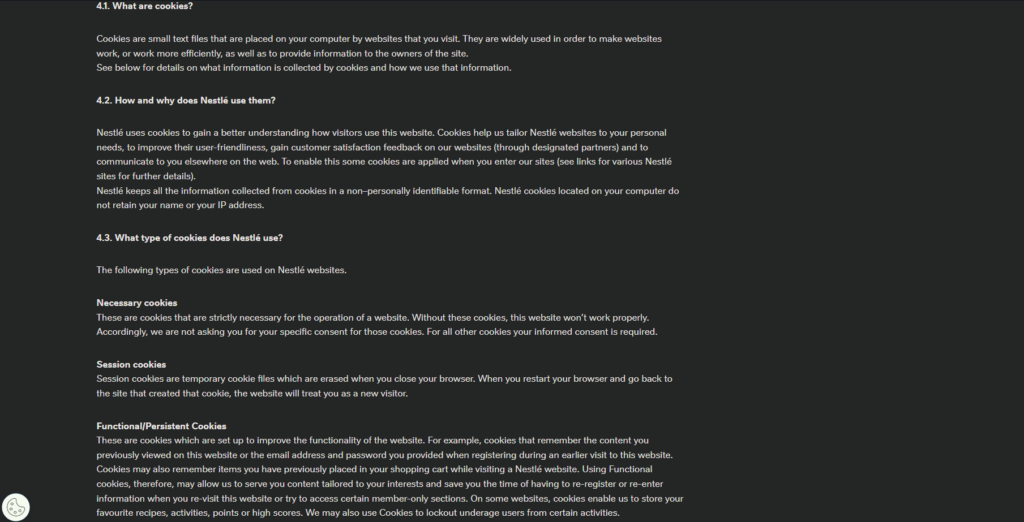
Nestlé is a great example of a well-rounded cookie privacy policy.
Nestlé’s privacy policy starts by summarizing what the policy addresses so the user knows exactly what to look for. Scrolling down, Nestlé goes into great detail about how they source and collect their users’ personal data.
They also provide thorough explanations as to why and how they use certain types of cookies. Complete with details on data storage, transfers, and retention, Nestlé’s privacy policy is exactly what it should be – comprehensive.
2. Uber
Uber is another big-name brand that serves as a great example of a cookie policy.
Immediately, Uber lets its users know what cookies are and defines the meaning of each cookie category they use. It’s a straightforward, jargon-free policy that all users can access and understand easily.
However, those characteristics, although crucial, aren’t what landed Uber on our list.
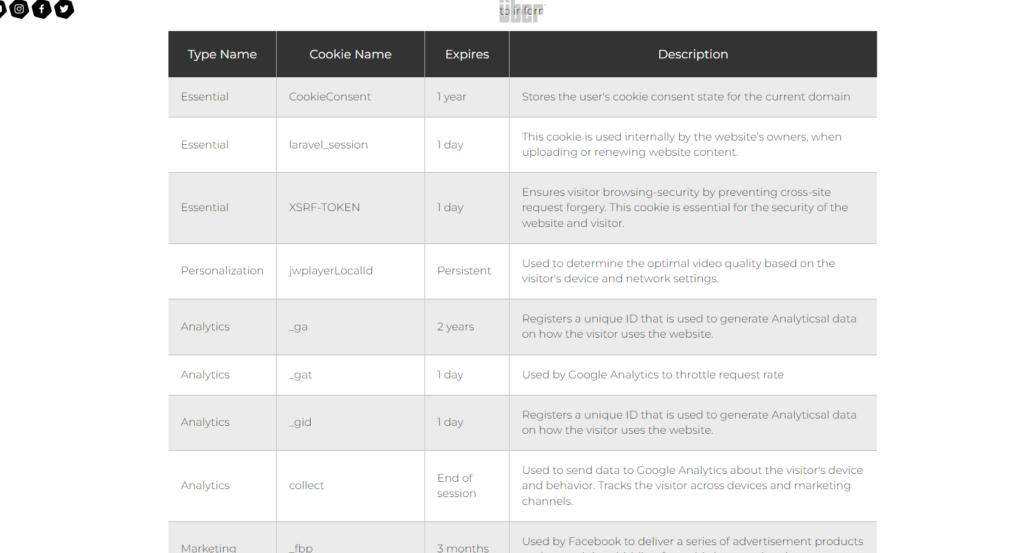
As Uber’s cookie policy continues, you’ll find an easily readable table. This table showcases the type, name, expiration date, and description of every cookie that Uber uses. By adding this table, Uber remains transparent with its users, establishing reliability, trust, and credibility.
Cookie Consent Examples
Next up, we take a deep dive into cookie consent examples.
As we did with cookie policy examples, we’ve explored some of the best cookie consent banner examples below.
1. New Balance
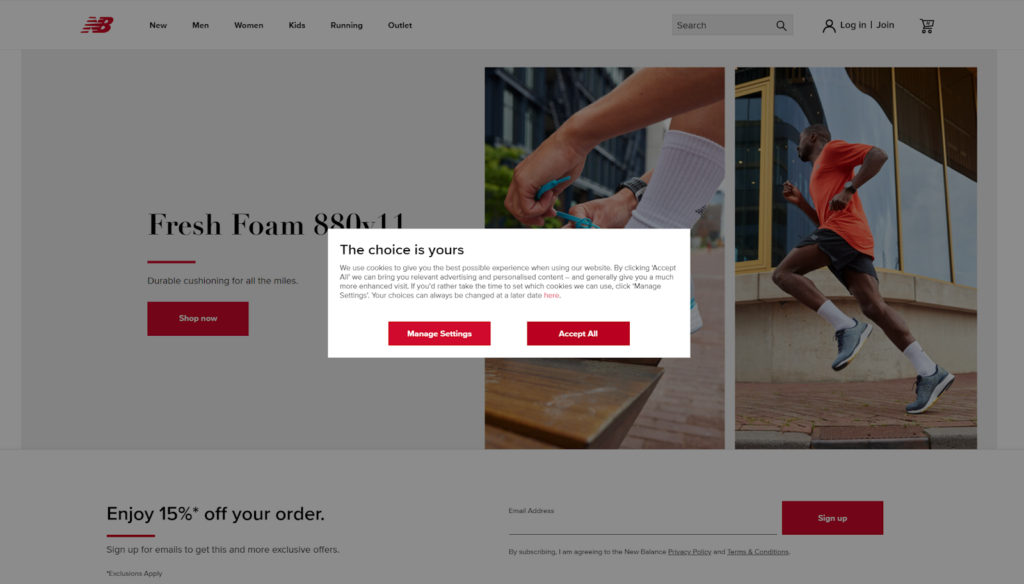
We praised CookieYes for displaying a visible, but not invasive, cookie banner. So, when looking at New Balance’s center-stage modal pop-up banner, you may not immediately realize why we chose it.
While it forcefully commands the user’s attention, its other design elements make up for its invasiveness. It’s a small, simple cookie banner with brand-specific colors and a positive title: “The choice is yours.”
Encouraging the users’ sense of autonomy is what makes New Balance’s cookie banner one to learn from.
2. Glossier
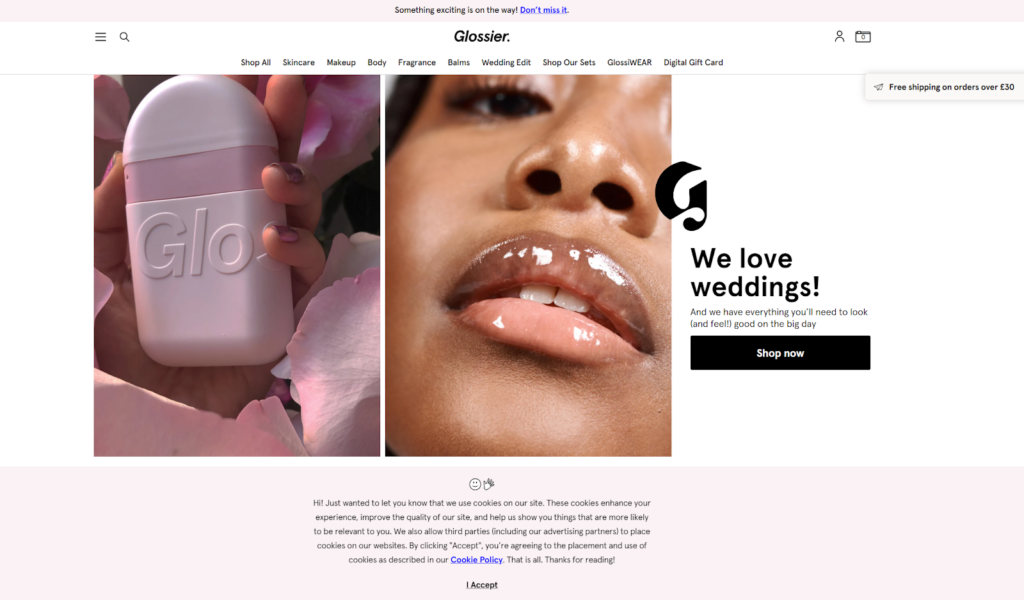
Glossier’s cookie banner is practically the exact opposite of New Balance’s banner, but its differences work extremely well, too.
Instead of using the middle of the screen, Glossier places its cookie banner at the bottom of the page. Its placement is perfect, as it doesn’t detract from its users’ browsing, but it’s not hard to spot either.
Another notable feature is the banner’s message, which has a casual, conversational tone and includes a couple of cute emojis. By highlighting this element of its brand personality, Glossier maintains user engagement throughout an otherwise typical cookie banner.
What’s more, Glossier’s privacy policy link catches your eye since the blue hyperlink contrasts distinctly with the pastel pink background. This use of contrasting colors is definitely something to keep in mind when prioritizing accessible design.
Cookie Popup Examples
Last but not least, let’s look at cookie popup examples.
And what better example is there to start with than Moovly?
1. Moovly
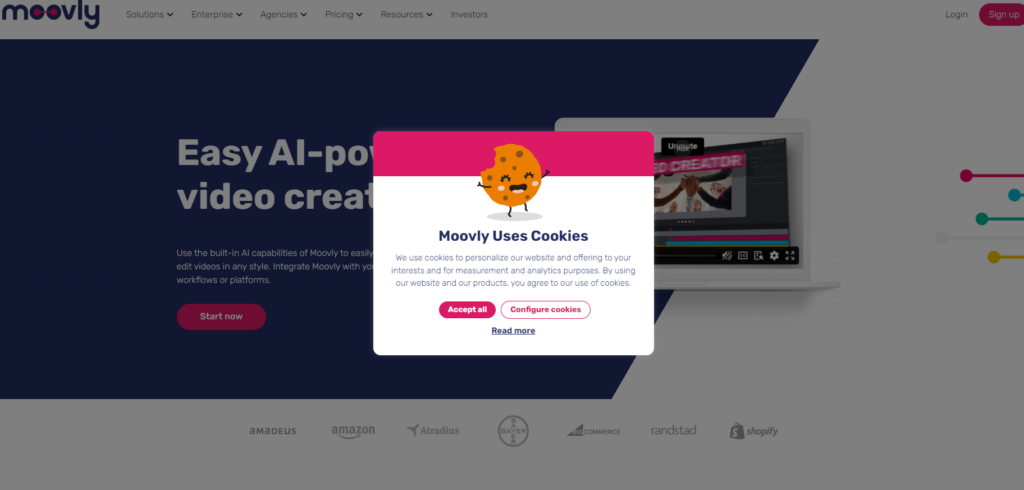
A lot of companies inject a touch of whimsy into their cookie popups by semantically connecting them to edible cookies. While this isn’t an uncommon trend, Moovly is one company that implements it extremely well.
Instead of a witty one-liner, Moovly uses a cute, cheery, cartoon-esque illustration at the top of its cookie banner. It’s engaging, fun, and playful, compensating for the central screen space it takes up.
But, as you know, cookie popups need to be more than playful.
Moovly also celebrates high contrast and simplicity down to its call to action (CTA) buttons. Where one button is red with white text, the other is white with red text. This is a great way to ensure users know exactly what actions they’re making without feeling tricked into making them.

2. Mary Polson
Mary Polson is a UX designer who created the design above as part of a UI challenge on Dribbble. Polson’s use of bright, positive colors and homely animations make this cookie banner a delight to witness.
It also displays an easy-to-use slider that allows the user to switch between their cookie preferences quickly. Of course, as a submission for a UI design challenge, it lacks essential CTA buttons and a privacy policy link.
But with those crucial additions, this cookie popup banner would undoubtedly enhance the user’s experience.

Cookie Banner Design Tips & Tricks You Need
Before we conclude our thoughts, we’d like to share some cookie banner design tips and tricks first. So, read our list below to discover how to design the most helpful, engaging cookie banners.
- Needless to say, your Accept, Reject, and Cookie Settings buttons are CTAs. So, you must design them as such, using contrasting colors and distinct shapes to draw your users’ attention to them.
- Include a brief description of why your website uses cookies.
- Consider the placement of your banner so as not to compromise the user’s otherwise frictionless experience.
- Avoid technical jargon in your cookie banner’s message; keep it simple instead.
- Always make your privacy policy link visible.
- Make it easy for the user to revoke consent.
- Prioritize accessibility.
- Don’t be afraid to showcase your brand’s personality – add interesting visuals like playful illustrations and icons.
- Offer clear consent choices for your cookies.
- Don’t ask for consent again for six months.
Cookie Banner Examples: Final Thoughts
We hope that you can perceive cookie banners as great design opportunities rather than mundane UI elements.
But if great UX design just relied on cookie banners, there would be no such thing as a bad product. Imagine what that world would look like.
In this world, designers also depend on the valuable user flow inspiration that Page Flows provides. On our website, you’ll find tens of thousands of screenshots, collected emails, and – of course – user flows. We document a wide array of user flows, from onboarding to general browsing.
Why?
We aim to help designers learn from the giants in their industry, regardless of what that industry is. From food to finance, from Deliveroo to Depop, we document everything you need to design better user flows.
Like the cookie banner examples we’ve discussed today, we celebrate simplicity, straightforwardness, and superior design.
Get started today to discover what a compelling user flow looks like!