Every user has a first experience with your digital product. It’s true what they say–first impressions matter. You have to nail your onboarding experience, ensuring that new users or employees can use your product easily. Although this process varies significantly between platforms, there are a few onboarding best practices to remember.
Let’s explore.
Why First Impressions Matter
Onboarding is the first encounter users have with a product. Whether you like it or not, the first-time user experience (FTUE) has a lasting impact.
The user’s discovery of your product marks the beginning of the process, which concludes at the “a-ha!” moment. This moment is when they realize your product is what they’ve been seeking.
Onboarding strategies vary between both platforms and industries. For example, they’re different for SaaS products used in the workplace than they are for recreational apps. After all, effective employee onboarding can greatly impact job satisfaction. It can even lead to better employee retention down the line.
Consumer-facing products still need to consider onboarding, though. Good onboarding can increase user adoption and also improve user retention rates. According to Keap, companies that invest in user experience see:
- 33% improvement in customer satisfaction
- 42% improvement in customer retention
- 32% increase in cross-selling and up-selling
So now the question is: how do you improve onboarding?

User Onboarding Best Practices
Whether your onboarding flow is for job training or capturing customers, there are some tips you can use. These ten best onboarding practices will ensure you’re on the right track.
1. It Starts With the Customer
Like most things in UX, onboarding starts with research. You must understand your users because, really, it’s all about them. Their “a-ha!” moment will come faster if you design the onboarding process to address their concerns.
Why are users coming to your platform? What are they trying to achieve? Starting with these questions will help you figure out a flow that helps them. And if you’re struggling to find the answers, conduct in-depth user research.
2. Segment Your User Base
Not all users are alike. You’ll have different users coming from different backgrounds. Some may have different reasons for using your product. Others may have different experience levels. A one-size-fits-all onboarding process won’t succeed.
Instead, aim for contextual onboarding that provides a tailored tutorial. We hear you: how do you tailor the experience to suit different users? Providing unique prompts means you can collect data on your users’ prior experiences. That way, you can provide platform instructions based on the user type. We’ll dive into more detail on this later.
3. Less Is More
We’ve all felt overwhelmed before, whether at school or while picking up a new skill. UX designers must try to avoid instilling this feeling in their users. In other words, don’t cram too much information into your onboarding.
Pace your onboarding to drip-feed information. Otherwise, your users might abandon the task at hand just because the learning curve is too overwhelming. In fact, 74% of users will switch to a different solution if onboarding is too complicated.
Furthermore, nobody wants to spend half an hour doing administrative tasks and filling out information. Where you can, ensure your onboarding process is as simple as possible, never asking more questions than you need to.
4. Give Users an Early Win
Users are fickle. They want to feel like the onboarding process is easy. Even if there’s a learning curve, you can convince users that it’s simple by giving them an early win.
Reward them with confetti, animations, success banners, and praise. It might seem unnecessary, but it can really make the user feel like they’re making progress. In addition, it helps them to form a relationship with your brand.
5. Use Progress Bars
Similarly, progress bars are vital to show users how far along they are in the process. It doesn’t have to be a progress bar, per se. Instead, you can use checklists and other visuals to demonstrate how far the user has come. It also shows them how much they still have to learn.
Again, this relates to the early wins we mentioned. Providing small bits of encouragement at each step helps the user feel secure and confident. Thus, they’re more likely to stay with your product.
6. Remember the “A-ha!” Moment
Onboarding is all about the “a-ha!” moment. The thing is, it’s up to you to make sure users hit this point. Guiding them along the process with progress bars and praise is all well and good. But you also need to do more.
Try to reduce friction as much as possible. Anticipate any questions or concerns your users might have and address them before the user even asks. And if they need additional support, provide a place where they can find it.
Another option is giving them a demo of the full product, even premium features. That way, they can see just how your product fits into their lives and solves their pain points.
This will help them reach that crucial point where they say, “A-ha!”
7. Use Tooltips
Users differ in terms of their technical expertise, too. While one user might pick up your product with ease, others might need more coaching. Some might even forget the information they learned during the initial product tour.
Keep this in mind while designing your onboarding process. Hotspots and tooltips can provide users with information when they need it. Here’s the difference:
- Tooltips: Provide information when they hover or click on an icon.
- Hotspots: Prompt users to click on particular features.
Utilizing these features provides a more user-centric onboarding experience because it means they can learn at their own pace. You also avoid overwhelming your users by trying to include every single piece of information right at the beginning.
8. Make It Fit Your Brand
Onboarding is part of your first impression. It’s time to set the tone for the user’s entire future experience with your product. This is especially important with professional products, where it sets the tone for the company culture, too.
However, it matters for consumer-facing products as well. Ensure that your onboarding experience aligns with your brand voice alongside the look. Consult your brand style guide throughout to ensure there’s a seamless transition between the onboarding and actually using the product.
9. Provide Ongoing Support
There are tons of reasons to provide additional support.
Take a company intranet, for example. Current employees might need a refresher. Similarly, they might need to double-check information in the company policy. They need a way to do this easily.
Continuous onboarding benefits your users, too, by providing them with more advanced ways to use your product. As time goes on, there will always be room for them to progress and learn more. Even after that “a-ha!” moment, nurturing throughout their time with your product will ensure you keep your loyal customers.
10. Hone Your Process
Iteration is a crucial component of UX–a fact you’re probably tired of hearing in our articles. The best way to make an exceptional onboarding process, though, is to continuously analyze and improve it.
Use tools to track and analyze user behavior, finding where they experience friction. Also, collect qualitative data through surveys and interviews to delve deeper into the minds of your users.
A combination of quantitative and qualitative data is your best bet. That way, you can ensure that you’re not missing a minor detail slipping through the cracks.
What About App Onboarding Best Practices?
The above best practices apply to onboarding of all kinds, from apps to websites and beyond. However, designers creating an app might want some more helpful tips and tricks. Follow these app onboarding best practices for the best results.
- Make the registration process as frictionless as possible. Limit the number of questions you ask, and if you can, let users register through their Google or Apple accounts.
- Use a welcome screen to initiate the sign-up process and introduce new users to your brand.
- At the same time, you do need to ask a few questions. That way, you can segment users based on their needs to provide a personalized onboarding process.
- Use onboarding checklists and progress bars to guide the users through the most important features.
- Drive the user through the steps they need to learn before they can access the full features.
- Use interactive walkthroughs to demonstrate the features of the app and help users learn.
- Allow users to skip the onboarding steps. Not everybody has the time to go through walkthroughs, and some might have some experience with your app.
- Gamify your app with elements like badges and points to encourage users to complete the process.
- Include a help center, allowing users to access a knowledge base of articles and tutorials. For B2B apps, you can store things like the employee handbook here.
- Later on, introduce secondary features so the users can become more advanced.
User Onboarding Examples
Learning the UX onboarding best practices is all well and good, but how do they work in practice? These three user onboarding examples all demonstrate the best practices we’ve already discussed. Let’s check them out.
1. Canva — Tailor the Experience
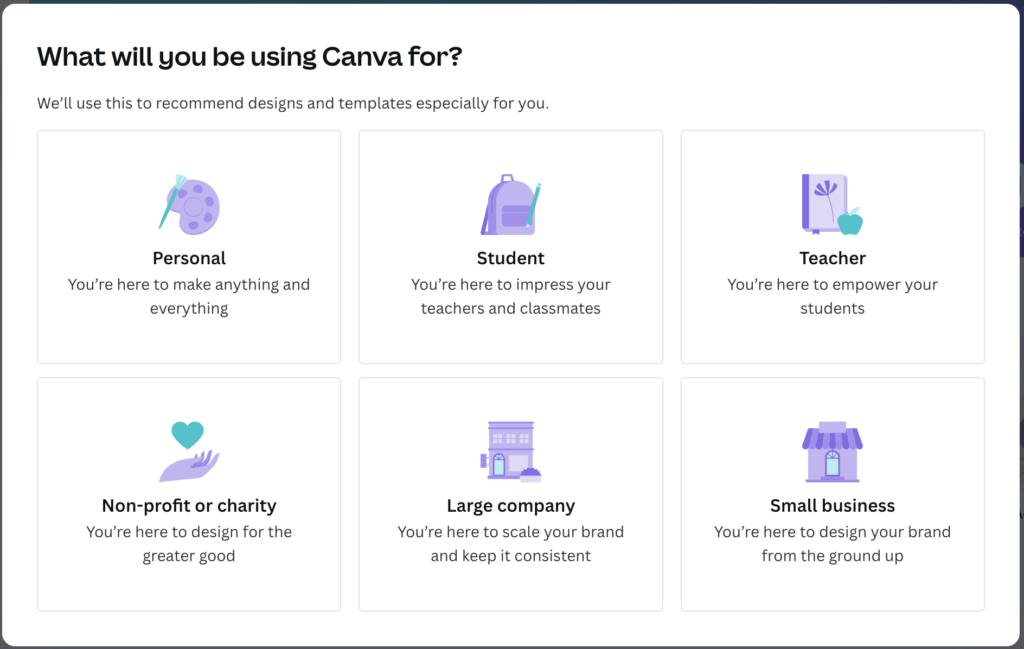
Online template editor Canva shows how easy it is to segment your onboarding experience. Remember, you have to tailor the experience to different users.
When you first sign up for Canva, the site gives you three options. Selecting an option tells Canva why you’re on the app, whether that’s for professional or personal reasons. Then, Canva uses this data to personalize the onboarding experience.
Those using the platform for work will use it in very different ways from those using it for fun. So, if you select the professional option, Canva walks you through presentations and leaflets. Meanwhile, for fun, it tells you how to make birthday invitations.
Doing this ensures the user gets the most out of the product.
2. Slack — Learn by Doing
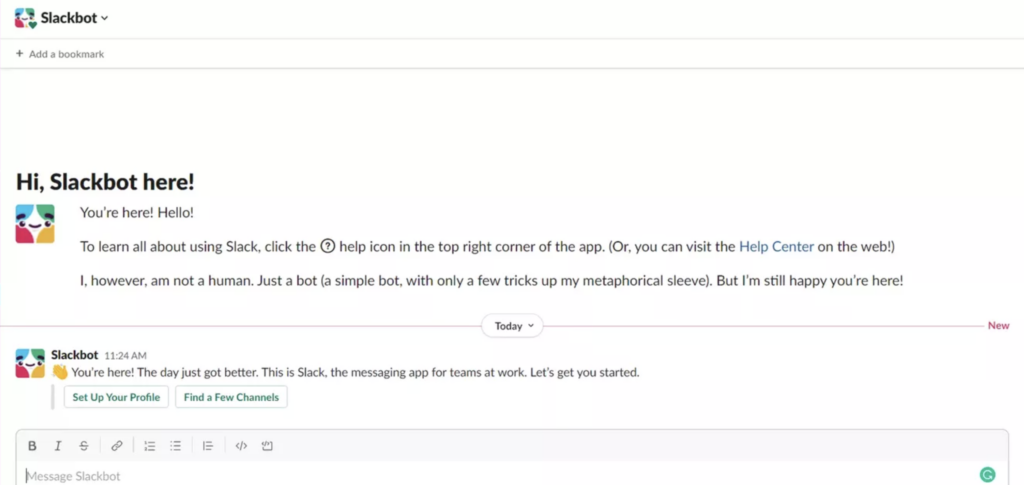
The communication platform Slack has a very thoughtful onboarding process. Firstly, when you load the app or site, there’s an empty state. The microcopy there guides you through the process of how to interact with the product. Meanwhile, tooltips provide information about the product as and when you need it. It’s such a non-intrusive, helpful way to onboard.
Plus, Slack uses an animated character called Slackbot to greet newcomers. This is all part of their branding, providing a friendly approach that helps users to connect with the brand. Slack’s onboarding is some of the best in the business for a whole variety of reasons. Primarily, its learn-by-doing approach is incredibly helpful for the type of app it is.
3. Calendly — Celebrating Milestones
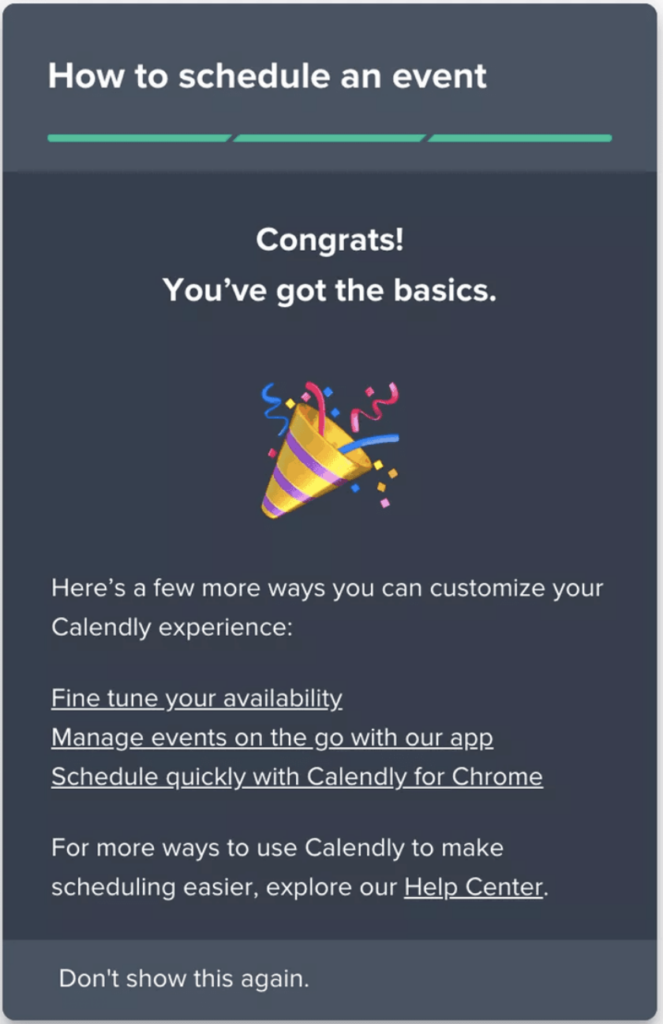
The scheduling app Calendly takes some time to set up. So, they need a way to keep users engaged. Firstly, it encourages users to set up a URL and time zone and sync to their calendar. Then, it provides a checklist for exploring the product.
Calendly encourages users to book a call with themselves so they understand the process. This is the perfect way to guide them to that “a-ha!” moment as they realize why they need the product.
Calendly celebrates the milestone once it’s done. This sense of accomplishment means that, after all that, the user is likely to stick around.
User Onboarding Tools
Although onboarding can seem difficult, there are several solutions to make it simpler. We’ve tried and tested plenty of them over the years, so we know what we’re talking about!
User onboarding tools fall into several categories. Here are the categories and the tools we recommend from each.
- Product marketing and signup: Products to help you build and refine a sign-up flow, like Proof, Auth0, and Clearbit.
- In-app experience: Products that help you improve the in-app experience, like Wistia and Apx.
- Email tools: Products for collecting, segmenting, and sending emails, like Customer.io and Mailchimp.
- Analytics tools: Products for gauging user experiences and identifying friction, like Segment, Heap, and Amplitude.
- Qualitative feedback tools: Products for understanding user and employee satisfaction, like Hotjar, UserTesting, and Helio.app.
- Customer advocacy tools: Products for collecting testimonials, like Extole and Referral Rock.
- Support tools: Products for providing support and designing help desks, like Zendesk and LiveChat
- Inspiration tools: Products for finding UX inspiration, like PageFlows and Product Adoption Academy.
Ideally, you should pick a few different tools to help you hone your onboarding process.
Improve Onboarding and More With Page Flows
These onboarding best practices might give you the nudge you need to design better product tutorials. But it’s just the beginning. You also need UX that wows throughout their experience. And for that, you need inspiration.
If you’re looking for amazing design inspiration, why not learn from proven products? Page Flows is a helpful resource for finding UX design ideas. Get started today to access our growing library of user flow recordings and finally stay up-to-date with current design trends.