User experiences depend on how responsive a site or app is. JSON files have helped transform our approach to creating good UX designs that work on virtually any device. But what is the JSON format? And is it easier to use than XML?
In this guide, the Page Flows team shows you just how important JSON is for most modern-day apps.

What Is the JSON Format? A Brief Explanation
JavaScript Object Notation (JSON) is a simple way of sending data online with human-readable text. Most application programming interfaces (APIs) from the past decade have used it for its flexibility. Though JSON has its roots in JavaScript, it’s flexible enough that other languages now use it often.
The JSON format is more compact than its competitors, making it easy for browsers to parse. In order to use JSON, all you really need is a basic grasp of HTML, CSS, and JavaScript. JSON is essential for coding JavaScript applications and is very simple to read or write.
Douglas Crockford first developed JSON in the early 2000s as an alternative to the clunky XML (or Extensible Markup Language). It quickly took off to the point that Yahoo was using JSON in its web applications by 2005. Crockford went on to publish JSON’s first standards in 2006.
The JSON format rules are fluid enough to work across most programming languages. Its main data types are strings, numbers, arrays, objects, and Boolean values, all of which are easy to parse. When building an online service, JSON is an easy bridge between the server and the web app.
The Importance of a JSON Format Validator
There are a number of online validators and “beautifiers” for your JSON creations. Though it’s an incredibly user-friendly format, small mistakes could still crash any app! The standardized JSON Schema allows for consistency and quality across all of your documents. To find a JSON format validator, simply search online and discover many free tools.
Once you find a validator, simply copy and paste your code into it. Click the Validate button to get instant feedback. If there are problems, it’ll highlight them and (depending on the validator) might provide recommendations on how to fix them. If you prefer using command-line tools, you can instead run the script in jq or Python.
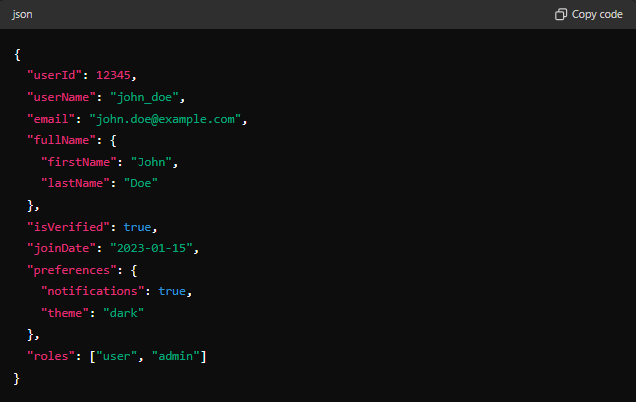
JSON Format Example: User Profile
Plenty of web apps give each user their own profile. This is just one of many tasks the JSON file format excels at. Take the example above, which shows the username “john_doe” alongside the person’s email, real name, and other information. When someone signs up with their details, the app’s front end sends them to the backend via JSON.
Each field is within double quotation marks for easy data parsing. This also helps avoid conflicts with single quotations, which fulfill similar roles in other coding languages. The JSON information usually goes best with NoSQL databases, though you could convert it to work with SQL. The UI will show these details when the user goes to their profile page.
The square brackets at the bottom of the photo show an array with multiple roles included. The example here highlights that John Doe is both a regular user and an admin, for example. These fields are all highly variable from one user to another. JSON’s use of semi-structured data is vital as it gives developers the flexibility they need.

The Benefits of JSON for UX Design
As a simple format that coders and machines can easily read, JSON is full of potential for any application. Modern web apps, in particular, can reach new heights of efficiency. If you’re making an app, for example, it can help your user experience shine. But what is JSON able to do for the UI and UX that other approaches can’t? Here are some examples!
1. Easy Data Exchange
JSON’s lightweight structure makes it interoperable across various platforms and systems. This means the front end and back end boast near-seamless communication. As a result, JSON apps send data much faster. This lets the UI update without refreshing and helps developers integrate third-party APIs into the app more easily.
2. Simple Troubleshooting
As you can see in the JSON format example above, these data structures are easy to read. The text itself outlines each field in plain terms; this makes UX debugging a lot simpler. Even veteran coders will be able to grasp complex errors (and fix them) quickly.
3. General Flexibility
Following on from this, JSON’s flexibility makes UI changes much less taxing for the team. They can create new mockups of a program without changing their whole setup, for example. Thanks to the format’s dynamic data structures, every JavaScript object (JSO) in the app is easy to edit.
4. Lower Latency
Performance is everything on a web app. When using JSON for a program, you can expect it to run smoothly — and with a lot less lag. This extends to asynchronous loading, where apps load several datasets at once. Without a responsive interface, people might stop using your program.
What are the Usual JSON Format Rules?
Though the main draw of JSON is its simplicity and flexibility, you still need to follow the format’s rules. Even a minor problem can sink an app, so always use a code validator. Here are the main rules to follow with JSON:
- Represent the information with name/value pairs. This is the bedrock of JSON’s ability to retrieve data with ease.
- Place arrays in brackets (‘[‘ and ‘]’) and objects in braces (‘{‘ and ‘}’). There’s no room for error when organizing complex data.
- Structure each table correctly. For example, a JSON relational database must define its schema and possibly flatten nested objects.
- Use commas to separate data. However, always make sure you never leave any trailing commas behind in your code.
- Don’t include leading zeros with your numeric values. They need to be double-precision floating-point numbers, which are more accurate.
- Always use the correct value formats. Boolean values should be “true” or “false” in lowercase to stay parsable, for example.
- Convert complex data types (such as dates) into strings. Always check if the information you’re adding has JSON support.
- Use UTF-8 encoding for all programs. This ensures your data is compatible with a range of systems and even Unicode characters.

JSON vs XML: A Full Comparison
While you can build a great web app with JSON or XML, these formats have their differences. In some cases, during the JSON vs XML battle, one may even be a lot better than the other! Here are the main factors you have to keep in mind when deciding between them.
1. Overall Format
As a markup language, XML is quite similar to HTML. The hierarchical tree structures begin with a root element, branching out into individual attributes. Meanwhile, JSON is more akin to a map. Each key or string has a value that goes alongside it.
2. Parsing
JSON uses basic JavaScript for parsing and is able to do this faster than XML. The latter is a lot more complex and would require a special XML parser. This can slow down an app dramatically while also making it harder to diagnose or fix errors.
3. Syntax
JSON is famous for being easy to read, down to its configuration files. This arguably makes it more beginner-friendly compared to XML. In contrast, XML relies more on visual hierarchy. It can also be quite verbose, with namespace declarations and a tag-based structure.
4. Flexibility
This is where the question of JSON vs XML becomes less clear-cut. JSON is highly flexible but only supports specific data types (including numbers, strings, and objects) by default. However, XML is always compatible with complex datasets and can often handle this information better.
5. Security
XML might be vulnerable to malicious edits to add external entities. These documents may also overload systems if they have too many nested elements (an “XML bomb”). However, JSON has its own flaws: JavaScript hijacking and cross-site scripting can lead to external code injections.

Which Websites and Apps Use JSON?
Plenty of apps use JSON due to its wide compatibility with modern programming languages. For example, Facebook, X (formerly Twitter), and plenty of other social media sites rely on JSON for their API. This stores a user’s profile data and lets them share posts. For hundreds of apps, this format is essential for processing the backend information.
As websites experiment more with motion graphics and sleek user interfaces, JSON helps them run more smoothly. When creating an app of your own, it’s likely that this will be the best choice for your API. Slack, Uber, PayPal, and more are already using it to manage their features. No matter the type of program you’re making, JSON can bring it to new heights!
Using JSON for Web Animations
One of many ways JSON can help the user experience is by using sleek animations. These are especially impressive when your motion graphics are responsive and have no lag. But what is a JSON file format able to do for web animations? And how exactly do they help?
These animations use vectors instead of pixels and boast a low file size due to JSON’s excellent data capabilities. This process requires Adobe After Effects to make the animation and a plugin called Bodymovin. The plugin converts the final graphic into a JSON-based “Lottie” vector file.
JSON makes sure a site’s sleek animations load faster. Otherwise, these simple elements could drag the entire webpage down. The small file sizes here will work fine on any device, no matter their specs or connection strength. On top of this, there’s no loss in quality to worry about.
All major CMS platforms (such as WordPress and Shopify) are fully compatible with these JSON animations. In fact, compatibility is at the heart of Lottie graphics. Their interactivity is one more selling point. Site or app owners can easily edit the graphics’ speed and position, for example.

JSON: The Key To a Smooth UX
If you’re making an app, you might be wondering, “What is the JSON format?” JSON could be a great choice, no matter the sector you’re working in. However, it always helps to see working examples of UX and UI designs.
At Page Flows, our video catalog shows you exactly what makes an interface shine. Check out our library today and get the inspiration you need to give JSON a try.