Using a color generator, random or otherwise, is a great way to experiment with your color palette’s prospective hues.
It can give you inspiration on what colors to use in your designs, and you may even come up with combinations you have never thought of before.
As a designer, a random color generator can prove a valuable inspirational resource for elevating your designs. For that reason, we’ll explore them further in today’s guide.
You’ll learn what random color producers are and why they are beneficial to every visual designer. Let’s dive right in!
What Is a Random Color Generator?
Random color producers allow UI designers to generate a random assortment of colors. That said, the majority of random color producers aren’t as “random” as you might think.
Many of these color generators provide you with customizable settings that relate to your desired hues and luminosity. You can also adjust the number of colors you would like your chosen tool to generate.
You’ll also discover the respective HEX, RGB, and HSL values for every color you generate. These values are crucial for developing a visually consistent color palette for a digital product.
There are a number of benefits to using these color generators, including the following:
- Inspiration: When you’re stuck in a rut, a color generator can shed some light on new, innovative color combinations.
- Skill development: Color generators will reveal color combinations that you’re yet to consider or implement. In this sense, color generators can teach you about harmonious and discordant color palettes.
- Bias-free: Let’s face it, if you specialize in a particular style, it’s likely that you’ll use the same colors. Instead of relying on colors you know work well together, generators will encourage you to step outside your comfort zone.
- Creativity: Your generator celebrates randomness, so you can use unconventional colors for your designs. Users will notice and remember your unusual color selections, which can enhance user engagement.

How You Can Use a Random Color Generator Wheel
Whether you’re exploring your generator’s dropdown menu or leveraging a random color generator wheel, it will prove a versatile tool. Below, you’ll find the ways you can use your chosen generator to improve your UI designs.
- A/B testing: Your generator will produce a series of color combinations quickly, which you can test on your users. This will help you find out which color palettes have the most positive effect on the user experience.
- Visual hierarchy: You can apply random colors to your interactive design elements, like buttons and input fields. This will reveal which colors are more prominent than others, helping you establish a strong visual hierarchy.
- Collaboration: You can also use your generator during the ideation phase of the design process. By discussing an assortment of random colors with your colleagues, you’ll easily identify which colors suit your project the most.
How To Generate a Random Color
Let’s see how to generate a random color effectively. Below, we go over factors you need to consider.
1. Researching Your Users
You may think that the first step to generating random colors is to find the best generator, but it’s not. The first step is to conduct thorough user research to understand and contextualize your users’ needs, desires, and preferences.
These findings will help you determine the colors that your target users resonate with the most, driving user satisfaction. Your research data will also clarify which of your generator’s settings you should customize.
While you’re researching, you’d benefit from brushing up on your color psychology knowledge, too. Color psychology helps designers understand the impact that particular colors have on the user’s emotions.
2. Experimenting With Settings
After you know your users inside and out, you can focus on your prospective generator. While most color generators operate the same way, we recommend seeking out ones with customizable settings.
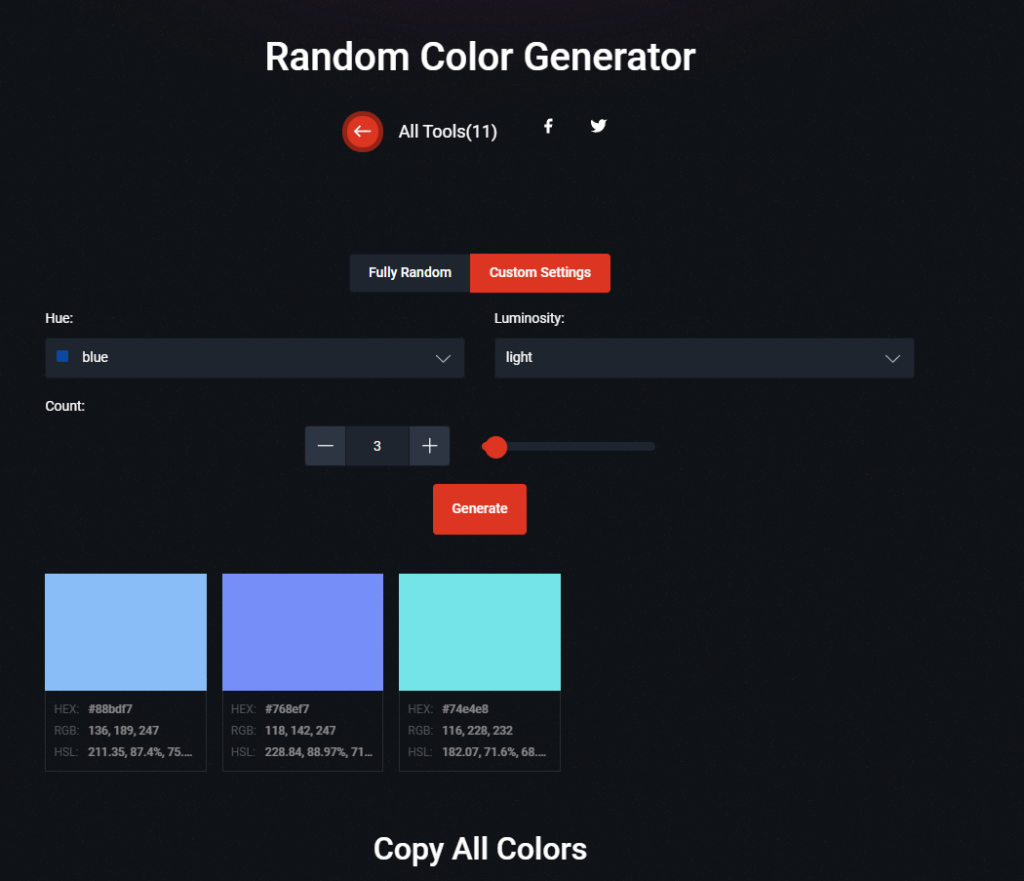
Take Color Designer as an example. With Color Designer’s color generator, you can choose from a range of hues, luminosities, and quantities.
Play around with these settings and note all of the different color variations you like the most.
Most importantly, remember to document your color’s HEX, RGB, and HSL values. You’ll need these values when you’re creating an easy-to-follow brand style guide.
3. Testing Your Choices
At this point, you’ll have a selection of colors that are visually appealing and align with your research findings.
Now you need to test them on your users by conducting A/B tests like we mentioned earlier. With your feedback, you can make any adjustments, focusing on color characteristics like tints, tones, and shades.
After you have the perfect assortment of colors, you can finalize your palette and apply it to your designs!
Tip: Prioritize accessibility when generating and using your color choices.
Experimenting With a Random Color Palette Generator
If you’re having trouble creating a color palette you like, you can always use a random color palette generator. To help you find the right one, we’ve listed some of our top picks below:
- Coolors
- ColorMagic
- Colormind
- Colour Palette Generator
- ColorKit
FAQs
What is a random color generator?
A random color generator is a tool that anyone can use to produce a random color. The color can align with the individual’s customizable settings or be completely arbitrary.
What are some bad color combinations?
Some color combinations you should typically avoid include:
– Brown and black
– Black and navy
– Turquoise and gold
– Cream and pastel yellow
– Brown and gray
What is the most forgotten color?
Many consider “quercitron yellow” as the color that people struggle most to remember. This may be because we once knew quercitron yellow as Dutch pink, which is, of course, misleading.
Random Color Generator: Use Page Flows for Top Ideas on Colors To Use
Never lose sight of the reason you’re trying to generate the perfect color selections — your users’ engagement. Every successful designer’s work stems from their dedication to user-centricity.
On the topic of user-centricity, you shouldn’t just rely on your color palettes to achieve it. Instead, you should combine your color choices with intuitive, seamless user flows to enhance your users’ in-product navigation.
To learn what exceptional user flows look like, you’ll need Page Flows. With Page Flows, you’ll have access to thousands upon thousands of recordings and screenshots that cover these flows.
From editing profiles to canceling orders, our resources detail every user flow you could ever take inspiration from. What’s more, you’ll never have to look far to find a brand/industry-specific flow that suits your particular design projects.
Whether you need web or mobile user flows, you’ll learn how successful brands optimize their flows with user-centricity in mind. Like a random color generator, Page Flows will provide you with the inspiration you need to create superior designs.
Get started with Page Flows today to learn how to engage and guide your users as they experience your products!