If it’s your goal to craft a mobile application interface that’s smooth and easily navigable, you’ll need the right tips. Some news you might find encouraging is that plenty of strategies are available which can provide incredible results!
Our guide, today, will take a close look at mobile app interface design processes. It’ll provide extensive tips and software recommendations that can make your dream design a reality. We’re also going to explore the essential elements you’ll need to consider for your interface.
By the time you get to the end, you’ll have all the info to build the smoothest user interface. And you’ll find that the tips increase user engagement and improve the user’s interactions with your app!

What Is Mobile App Interface Design: 3 Top Features To Include
Mobile app interface design refers to the elements and everything you see when using a mobile application, and it consists of several features.
You’ll find that these features include the navigation design, the visual representation of elements and the structural actions behind the app. Looking at these closely, we can break the mobile app interface design down into essential elements like text fields and menu buttons. But there are a few more, covered below.
1. Bar User Interface Element
As you piece together your mobile app interface design, you’ll find that the bar user interface element is vital. It allows users to enter keywords and find specific app content. It can also tell users the progress made for specific processes the app completes.
Several types of bar user interface elements exist, so let’s look at these closely:
- Tab bar: This user interface element in mobile applications is visible at the bottom of the screen. Users can complete user actions using this element to switch between types of app content.
- Progress bar: UI and UX designers use this element frequently in music player apps and podcast apps. It aligns with user expectations, letting them know how much progress the app has made when playing the content.
- Loading bar: This is an element that tells users how far along app processes are. It reveals progress percentages or timings to indicate the app’s progress. Users can also see the current stage of the app’s process with this element.
2. Switch User Interface Element
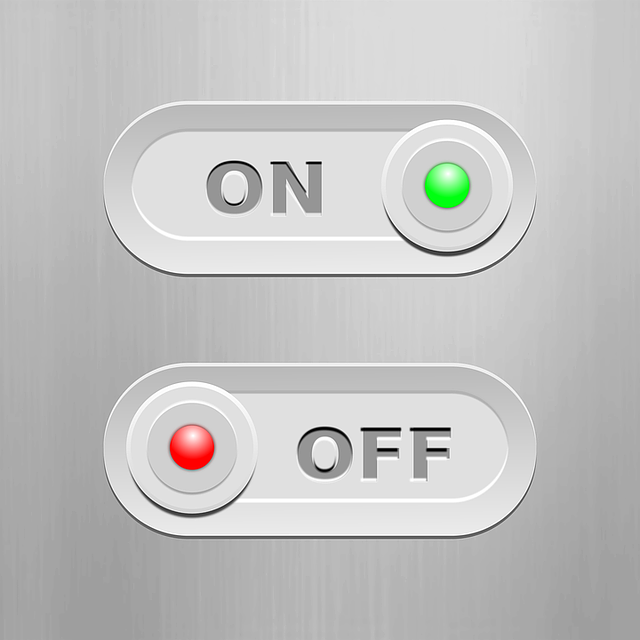
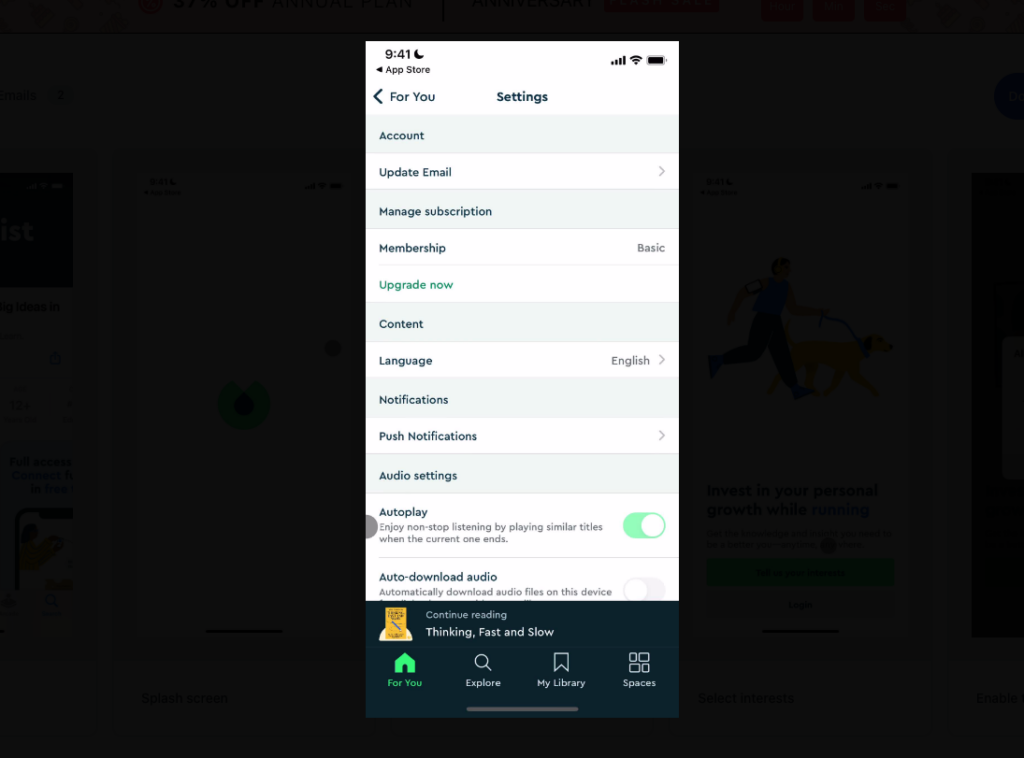
You’d find it difficult to find an interface design for mobile apps without a switch user interface element. These distinctive and clear elements ensure users know whether a feature is active or the app is on or off. Some design choices UI designers use for switch elements include:
- Contrast: Since the switch feature is such a crucial UI interactive element, users need to see it easily. UI mobile app designers, therefore, use contrast to ensure this feature really stands out. For instance, the switch itself may be a lighter color than the background and change color when activated.
- Animation: The switch element tells users if a feature is on or off, so the element should be user-friendly. And it should be easy to understand. It’s with animation that UI designers can enhance the user-friendly nature of these elements. For example, they may use a moving bell animation to show that the user has activated notifications.
- Track and thumb: These buttons feature a track and thumb element. The track is the small space along which the buttons move. You’ll notice that the thumb is the circular button itself that slides from left to right.
3. Icon User Interface Element
You’d also find it challenging to find a mobile app interface that lacks an icon element. These informative signs enhance usability; they’re pictograms in the context of digital design and can replace text. A few types of icons exist:
- Interactive icon: This is an element that users can tap on to interact with the app. It provides information about the buttons’ features or functions and it also offers details about other interaction processes without the need for text.
- Decorative icons: These are types of elements that offer aesthetic details and augment the unique style of the app. Often, they’ll not have a functional purpose, but can attract the user’s attention when using the app.
- Clarifying icons: This type of element is a visual marker that explains categories of app content. They’re not layout elements that users directly interact with. However, these illustrative elements also explain key features and text or copy can accompany them.

How Have Mobile Apps Influenced Interface Design?
Mobile apps and mobiles aren’t going away for now, and they have influenced interface design in many ways. You might recall just how disorganized or unintuitive interface design once was on mobile devices. Misaligned elements once translated poorly onto small screens.
But once mobile apps became more refined, the hot mess of scattered buttons began to make sense. Interface design organized elements that were not quite in the right place. Below we have outlined some ways in which interface design has influenced how mobile apps have changed.
Responsiveness Is Fundamental
As stated in the Forbes source, responsiveness in terms of mobile interface design is crucial. It aligns with shifts in customer preferences. For instance, designs now fit smaller screen sizes with precision, and users can navigate menus with ease.
We can say that this transition came as UI designers acknowledged that users no longer utilize conventional browsers exclusively. Instead, they access app versions of specific websites. For instance, even when navigating to a Facebook webpage on a mobile device, the app version may launch instantly.
Interaction via Touch Influences Button Elements
It’s because of the shift to touch-based interfaces that interface design has changed in terms of button sizes and layouts. You’ll notice that UI elements have really changed on mobile devices, getting larger and easier to tap.
At the same time, the layouts now prioritize easy touch-based navigation. Designers space buttons out sufficiently to make intuitive navigation a reality.
A Need for Visual Hierarchy
As stated in a ResearchGate study, it’s often due to poor user interface that apps fail to maintain user interest. The study further adds that improved usability can come from clear hierarchies and logical navigation flows. So, to guide app users and ensure they can navigate content well, designers need to prioritize specific visual hierarchy methods.
Such visual hierarchy methods affect navigation structures and interface design. Designers now group information into specific, easily navigable categories. They use interaction patterns as a guide for elements, such as dropdown menus and fonts in specific sizes. For instance, they may use large fonts for main categories and smaller ones for subcategories.
Mobile App Interface Design Tools To Consider
Now, making your mobile app interface vision a reality is easier with specific design tools. We’ve got top options to help bring the aesthetic appeal to life.
Here, we’ve listed the best software options for mobile app UI design.
Adobe XD
Adobe XD is an extensive tool that’s ideal for creating smooth mobile user interface designs.
It’s software that works well for creating interactive user experiences. Through vector-based tools, it allows UI designers to craft simple designs. You can create wireframes, prototypes, and manage any color with Adobe XD. You’ll also be able to manage character styles and other components with this tool.
Figma
Figma helps you create the mobile UI design you’ve been planning and transform ideas into user-experience-enhancing interfaces. Countless templates are available to help you begin. You’ll also find icons, illustrations, shapes and colors all within the Figma software.
Marvel
Marvel is such an intuitive software that works as a codeless tool. You can create mobile app UI designs with it, and it provides plenty of templates. This tool also offers cloud-based features that enable you to work on your design from various devices. And it comes with an asset library and an extensive selection of stock images.
The 3 Best Mobile App User Interface Design Examples
Now, it’s important to remember that mobile app user interface design examples aren’t all identical. Each brand or platform has an interface design for its app that really stands out and gets its users’ attention.
We’ve looked at a few examples of interface design for mobile apps here; let’s explore some of the best ones.
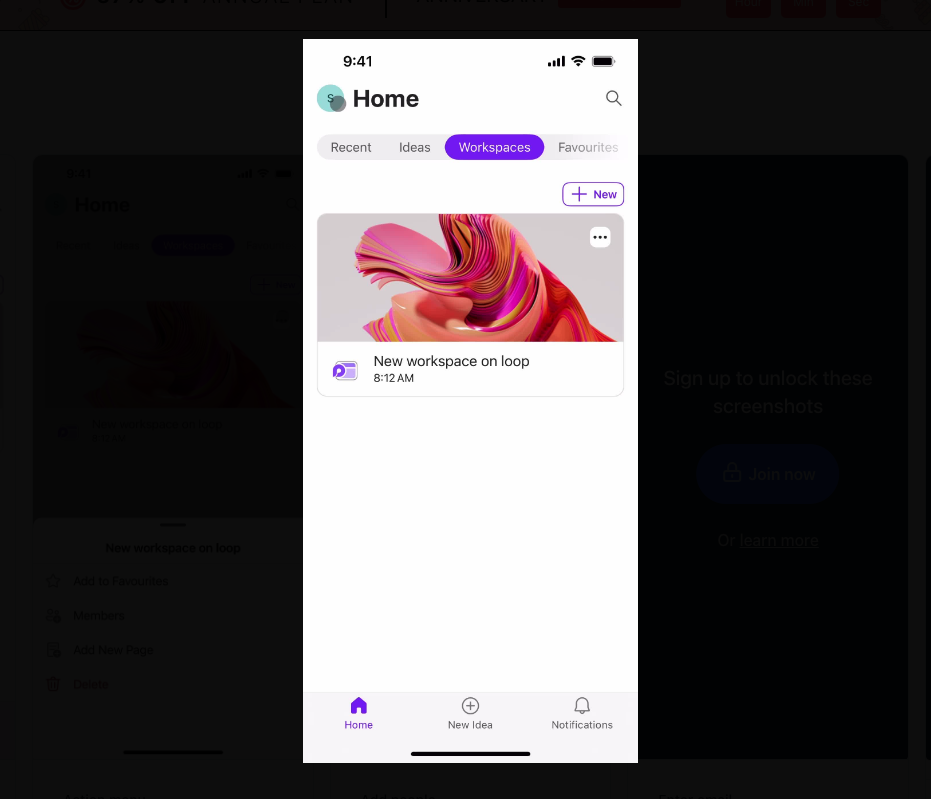
1. Microsoft Loop
The simplicity of this Microsoft Loop interface design is what makes the user experience intuitive and easy. With a simple bar along the top of the home screen, this user interface makes navigating the app convenient. It also makes perfect use of contrast between the bar options and the font.
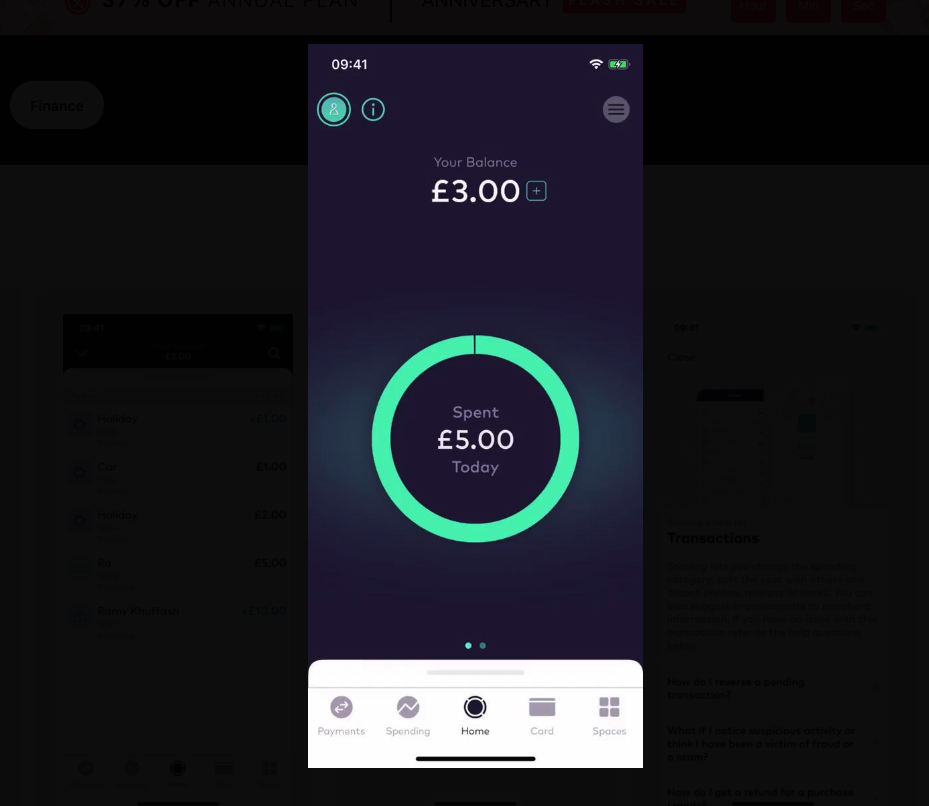
2. Starling
The minimalism of the Starling interface transaction page ensures users find every element instantly. The UI design features a few interactive and decorative icons at the top of the screen. It also has a menu feature that designers have placed in the top right-hand corner. This feature aligns with the “F-shape” pattern users – typical in standard user behavior.
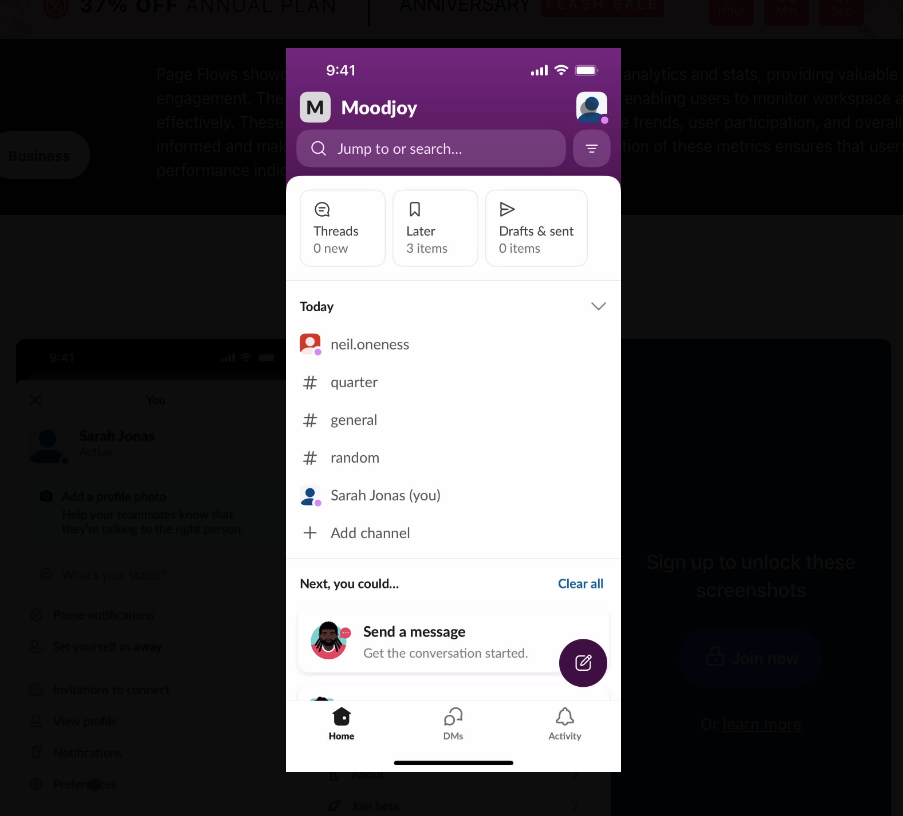
3. Slack
With a simple search bar at the top and easy-to-navigate interactive icons, the Slack app combines style with function. The most important elements stand out thanks to their bold fonts. Users can also locate the “compose a message” icon because of the contrast between the image and the purple background.
Best Mobile App Interface Design Processes and Tips
A well-designed user interface requires a few best mobile app interface design processes and tips. From top human interface guidelines to font designs, the tips below can make a difference to your mobile app design. They’ll help you create a seamless user experience.
Here’s what we highly recommend.
Check Competitor Mobile App Designs
Your journey toward creating the right app interface has to start somewhere. And while you shouldn’t copy competitors’ designs, your inspiration can come from their work. Check competitor mobile app interfaces, as well as UI designs on other platforms.
For instance, looking at the Dribbble platform can give you a good idea about trending designs. You’ll be able to use them as a foundation, put your own spin on them, and make them your own.
Draw Inspiration From Artistic Trends
The future of web design and mobile app design isn’t likely to remain the same. It evolves alongside artistic trends, which include new extremes. These new designs include ultra-minimalism and cinematic storytelling trends.
As you draw inspiration from artistic trends such as these, you can craft a winning app interface. For instance, a travel app that adopts the minimalist design trend might have fewer visual elements. Instead, a single image, such as a mountain landscape or popular landmarks, can catch your user’s eye.
Think About Visual Elements
You’ll need to arrange visual elements strategically, which might involve thinking about the visual hierarchy method. To do this, use a clean, intuitive layout that prioritizes the most important app features. You can also arrange content menus effectively for easy app navigation.
What’s more, you should consider a few components of the visual elements when creating the right visual hierarchy. This includes using size to focus the user’s attention on the important elements. It also involves using contrast to show key information and considering the “F-pattern” users follow when interacting with the interface.
Consider Color Schemes
Color schemes and contrast help you craft the right visual hierarchy, and it begins with looking at the color wheel. For instance, you might incorporate complementary color opposites to make specific elements boldly stand out.
So, you might use a neon blue background color for your dropdown menu headers and red fonts that stand out. This will ensure users pay attention to the essential information on the app.
Mobile App Interface Design: Use Page Flows To Get Top Ideas
It’s definitely not easy to craft the perfect app. That’s why having the right tips and tools at the ready is important. Inspiration and the perfect user flows are also crucial, which are exactly what you can find with Page Flows.
As you use Page Flows, you get a selection of specific user flows that reveal the user’s path. You also get screenshots of those flows, which you can look at more closely. We record the user’s navigation process as they use renowned brands. These recordings help you find inspiration for interaction design ideas.
For all the mobile app interface design inspiration you need, Page Flows is here. Start your journey with Page Flows; perfect the flow and design of your mobile app interface today.
FAQs
How can I tweak the interface design for my app?
It’s always worth seeking user feedback to make tweaks to perfect the interface design of the mobile app. Doing this can include completing A/B testing approaches and asking for stakeholder or user opinions on the interface.
What are the three golden rules of user interface design?
These include placing your users in control of your app’s interface and ensuring it’s comfortable to interact with it. It’s also important to ensure the interfaces are consistent across several platforms. Consistency is important across mobile and desktop platforms to enhance the user experience.
How should a designer test the mobile app interface before launching it?
This can involve checking features such as the front-end development output if you’ve used code-based UI software. At the same time, completing usability testing and involving users is ideal. These tests ensure users are comfortable with the app and that it functions perfectly!