It’s no secret that teams within an organization often have to juggle multiple projects at the same time. One of the biggest challenges that said teams face is managing a multitude of varying goals, duties, and projects.
However, project management maneuvers like a car engine with dozens of moving parts. Consequently, it’s incredibly easy for a project to derail into chaos and disorganization.
More often than not, poor monitoring of progress, unclear communication, inefficient collaboration, and missed deadlines cause this chaos. The solution to every one of those problems is employing project management software.
The best team management apps can revolutionize the way you plan, organize, and complete tasks.
In today’s guide, we’ll explore such beneficial tools, what you can use them for, and how you should use them. We’ll also reveal the best apps that you can use to simplify your project management process.
What Is Project Management Software?
Naturally, when it comes to project management software, you’ll have some questions. One question that has likely crossed your mind is, ‘What is project management software?’.
Project management software refers to a vast array of platforms that help teams of all sizes manage their projects. Specifically, project management software allows teams and businesses to plan, organize, and distribute resources for certain projects.
Through such tools as a team management app, both on-site and remote teams can collaborate with ease. What’s more, project management software enables teams to monitor their progress concerning defined tasks and duties.
For team managers, team management tools can simplify essential duties like budget control and time tracking.
From simple checklists to resource scheduling, project management software unifies and optimizes your team’s collaborative efforts.
Ultimately, project management software provides vital governance over task assignments whose completion is essential for the success of the business.
What You Can Use Project Management Software For?
To select and use the perfect project management tools, you must first know what said tools should offer you.
Below, we’ve assembled a compilation of useful features that project management tools can provide to help you complete projects efficiently.
Project Planning
You can’t manage a project if you haven’t meticulously planned each of its stages. A good project management tool will allow you to break down your project into digestible steps and goals.
It’s worth noting that finding the best project management tool for your team relies on your organization. Specifically, which type of project management methodology your organization adheres to. There are two kinds of project management methodologies—the waterfall approach and the agile approach.
The waterfall approach involves the breakdown of a project into several steps. What’s more, each step must follow a linear, sequential formula. In other words, the waterfall approach dictates that your team must complete the project’s steps one at a time. This approach works well for tasks that have recurring, predictable processes and if your project’s goals won’t fluctuate over time.
The agile approach, as its name suggests, allows teams to take a more flexible approach to project management. In essence, this approach will enable teams to revise projects mid-workflow continually. Generally, if you were to adopt the agile approach, you would have brief phases of work followed by reflection. During these reflective periods, you would analyze your work thus far and incorporate customer feedback. Overall, it’s an iterative process, much like UX design and UI design. Additionally, this approach promotes swift adaptability, making it ideal for projects that may change quickly.

Resource Management
An important facet of project management is the ability to acquire, allocate, and manage resources. Your resources may include individuals and their competencies, technology, or even machinery. The ideal project management tool should help you manage these resources effectively.
Resource management revolves around your ability to monitor your team’s utilization of assets, track time, and stick to a budget.
The right task management tool will help you ensure that your team won’t miss project deadlines or make costly decisions. Additionally, the right task management tool will guide you toward using limited resources as effectively and efficiently as possible.
Tip: Even if your chosen tool doesn’t exhibit resource management capabilities, check if it supports integrations with resource management software.

Team Tracking
Similar to resource management capabilities, your task management tool should allow you to monitor your team.
Resource management does cover the effective use of resources, including the time spent using them. However, effective time management goes beyond the utilization of resources.
With the right tool, you could also identify whether your team is taking too long to complete a project. You should also even look into task management tools that allow you to set time expectations for upcoming projects.

Automated Reports
Project reports help you monitor the progress of your projects. Given the importance of project oversight, there are several things you should include in a project report, including the following:
- Your team’s accomplishments, including milestones and completed tasks.
- Project updates pertaining to the status of ongoing tasks.
- Data that clarifies the financial health of every project.
- A breakdown of any factors, both internal and external, that could potentially hinder progress.
- A brief indicator of when the project report was last updated.
It sounds like a lot of time-consuming work. Thankfully, the best team management tools automate report generation. With automated reports, the increase that you’ll see in efficiency and productivity will speak for itself.
Tip: Your tool should grant you the ability to generate status reports, risk reports, utilization reports, and variance reports automatically.
Data Visualization
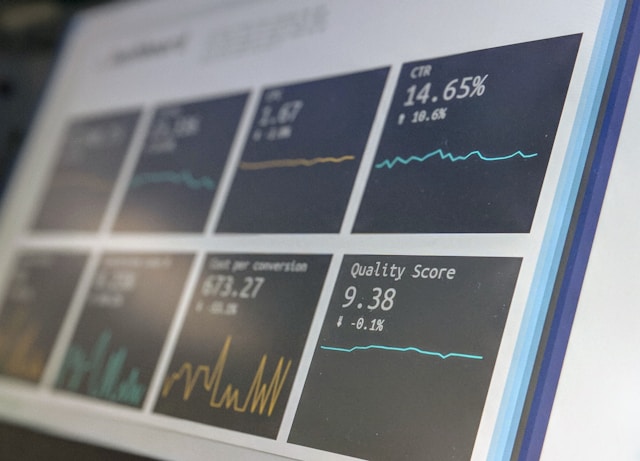
Having a visual representation of your project plan, goals, and requirements will improve transparency, communication, and collaboration among your team.
The best task management tools provide simple, easy-to-follow ways of representing said essential data. Beyond basic features such as to-do lists and project calendars, you should have the ability to utilize more advanced features. Specifically, those advanced features should include Kanban boards and Gantt charts.
Collaboration
Seamless, clear collaboration is imperative if you hope to complete projects successfully and efficiently. Great team management tools will provide a central workspace for your team to collaborate, revise, and share project-related tasks.
The tool you choose should support basic functions such as file-sharing, feedback, and brainstorming. The standout feature of the best collaborative task management tools is their ability to provide the utmost visibility.
If your chosen tool can make project status updates and client communications completely visible, then your tool effectively supports collaboration.

How to Choose the Perfect Project Management Tool
Choosing the right project management software takes more than knowing what it can offer you and your organization.
We’ve revealed some of the most vital facets you should consider before diving headfirst into a brand-new team management tool.
1. Your Organization’s Needs
As helpful as you find team management tools to use, they can’t know your business’s needs for you.
Utilize your knowledge of your organization. Take into account the size of your team, client demographics, and the type of projects your business usually works on.
By taking the time to evaluate your organization’s needs, you’ll have a clearer picture of your ideal internal processes. In turn, this will then help you decide if/how you can tailor your chosen tool to your organization’s needs.
2. Scalability
Your team management tool should exhibit the capacity to grow and adapt as your business does. If you intend to scale your business gradually, your chosen tool should help you develop proficient processes and practices.
As you scale your business, you should look to your project management tool to naturally expand alongside your employee pool. In other words, you should investigate to see if your chosen tool allows for unlimited users.
3. The Quality of the User Experience
As with any other digital product, your chosen software should follow a design process that prioritizes the user’s experience.
Your project management tool should exhibit UX design principles, such as usability, fluid navigation, consistency, accessibility, and empathy. Your software provider should appreciate that your time is valuable and should strive to create a straightforward user experience.
4. Your Organization’s Budget
You need to decide how much you need/want to spend on project management tools.
You could pay as little as nothing for a simple project management tool that offers basic features. On the other hand, you could end up paying thousands of dollars for team management tools that support advanced functionalities.
It’s up to you to decide if the projects you work on would benefit from pricier, advanced project management software.

How to Use Project Management Software
Now that you know what you can do with project management software, it’s time to use it!
Don’t worry if you don’t quite know how to get your head around using project management software. We’ve got you covered; in five simple steps, you’ll have the know-how to utilize project management software effectively!
Here’s how to use project management software!
1. Choosing the Right Tools for the Job
Some team management tools suit certain types of projects and industries better than others.
What you need to do before investing in any tools is consider the factors we explored in the previous section. You should also look to see what features you will access if you were to invest in your prospective tool.
From there, you should compare the features of your chosen tool to others like it. Look into reviews from other users to determine if you’re about to make a financially healthy decision for your business.
2. Defining the Scope of Your Project
You must break down your project into manageable steps, assign roles and duties, and set deadlines. You should also estimate the necessary resources and costs.
You can use your project management tool to create a project plan that covers all of those bases. In addition, you should use your management tool to set priorities and identify any issues that could impede your progress.
3. Monitoring the Progress of Your Project
You should use your chosen management tool to monitor your team’s task completion, performance metrics, budget, and resource utilization.
By monitoring your team’s progress, you can identify and resolve any risks to project completion.
4. Collaborating With Your Team and Stakeholders
You should also use your management tool to share files and feedback with your team and stakeholders. Additionally, to get the most out of your chosen tool, you should use it to brainstorm ideas and host meetings.
By collaborating with your team and stakeholders, you can strengthen your collective alignment concerning project objectives.
5. Evaluating the Outcome of Your Project
Utilize your project management software to compare your team’s performance against your predetermined performance goals.
By doing so, you can clarify the success of your project and identify potential areas of refinement. From here, you should use your team management tool to set new goals for your team to ensure proficiency. What’s more, you should celebrate milestones in which your team has already demonstrated proficiency.
Workfront: An Analysis
Now that you know how to implement project management software properly, the next step is to evaluate some examples.
Tip: Take what you’ve learned thus far and apply it to our analysis of the dominating team management apps. By doing this, you’ll find it easier to decipher if the following apps will help you manage your projects.
The first example we’ll look at is Abobe’s Workfront, an incredibly beneficial work management platform.
Here are Workfront’s most helpful features:
- Contextualized Strategy: With Workfront, you can outline your business’s goals and map project requests against them. This feature will help you select the types of projects that will propel your business toward success.
- Automation and Integrations: You can streamline your workflow with automation, including premade templates and real-time report generation. What’s more, you have direct access to essential integrations like Adobe Creative Cloud.
- Quality Maintenance: You can use Workfront to allow your stakeholders to leave feedback, ensuring your team delivers high-quality work.
Jira: An Analysis
Jira Software is another extremely useful project management software that supports agile project management methodologies.
Here are Jira Software’s most compelling features:
- Agility: Jira supports Scrum and Kanban boards, helping you break down complex projects.
- Time Management: Jira offers project timelines that ensure every team member and stakeholder has complete transparency regarding ongoing projects.
- Integrations: With Jira, you’ll have access to over 3000 extensions and 500 integrations, including Google Drive.
Asana: An Analysis
Asana is an effective project management tool that focuses on improving your team’s productivity.
Here are Asana’s most advantageous features:
- Enhanced Productivity: With automated updates and a birds-eye view of projects, you can prevent any potential blockers. This means that you can ensure a continuous, unobstructed workflow with no delays.
- Maximised Resource Utilization: With Asana, you can schedule incoming projects without overwhelming your team. Additionally, if you still don’t see the results you want, you can see how your team is utilizing your resources. From there, you can make the necessary refinements to your project schedules and resource usage.
- Responsive Design: You can use Asana on your desktop or your phone, ensuring that you’ll never miss any important updates.
The Best Free Team Project Management Apps
Now that we’ve explored some of the dominating project management tools in the business landscape, it’s time to consider alternatives.
Furthermore, it’s time to consider free alternatives. To help you adhere to your business’s budgetary requirements, we’ve assembled a list of free team project management apps.
- Connecteam
- Todoist
- Monday.com
- Trello
- TimeCamp
The Best Team Management Apps: Optimizing Your Team’s Workflow
Hopefully, you’ve finished this article feeling confident with the guidance we’ve provided concerning project management software.
Above all, the key takeaway is that you should evaluate and choose a team management tool that suits your business. If you take the time to assess the tools in your scope thoroughly, you’ll immediately reap the benefits. You’ll find a tool that will streamline integral project management processes, allowing you to focus on growing your business.
Speaking of finding the right tool, it’s equally important to find the right inspiration. Meet Page Flows.
With Page Flows, you will learn how to interact with your users as they interact with your products.
You have access to an abundance of emails that we collect when we record user flows. This means that you’ll know how to receive and implement your customer’s feedback into your project management processes.
From Gmail to Grammarly, we know how to manage our projects in accordance with our prioritization of the user’s experience. Our 1,000 happy customers can vouch for us!
When it comes to finding the best team management apps, don’t leave it to guesswork. Choose tools like Page Flows that’ll propel you toward success!
Get started today to access our growing library of user flow recordings and finally stay up-to-date with current design trends.