UI design isn’t just about unifying the visual appeal and functionality of websites and mobile apps. UI design also plays a significant role in the playability of video games.
UI designers must consider immersion, helpfulness, and storytelling when designing video game user interfaces’ visual components.
However, this balance can prove difficult to master initially for designers who predominantly work on websites and mobile apps.
That’s why, in today’s guide, we’ll focus on the ins and outs of game UI design. You’ll learn what game UI is, its most integral components, and how to design video game UIs.

Video Game UI Design: Exploring UI Meaning in Games
To start with, it’s only fitting that we address UI’s meaning in games before we discuss anything else.
On the surface, UI in gaming refers to the user interfaces that users interact with while playing video games. Game UI comprises several visual components that help users engage with and progress through the game’s narrative.
These visual elements generally help the user navigate the game’s environments, learn desired information, and achieve in-game goals.
Unlike web/mobile app UI design, a game’s UI elements should not dominate the user’s attention. The goal of a game’s UI components instead revolves around enhancing the player’s immersion and allowing for unhindered playability.
The Key Components of Video Game UI
In the previous section, we touched on the meaning of video game UI. To truly understand how game UI works, however, we need to break it down into its most crucial components.
Let’s start by discussing the game’s narrative and the fourth wall.

Narrative & The Fourth Wall
Simply put, the narrative refers to the video game’s story that the player progresses through. While the UI designer is not responsible for creating a game’s story, the narrative will influence the game’s UI elements.
Now, let’s address the fourth wall. Steven Conway sums it up perfectly in his study titled “A Circular Wall?: Reformulating the Fourth Wall for Videogames.”
Conway claims that the fourth wall “describe[s] instances when the videogame medium consciously oversteps the boundaries between diegetic and non-diegetic.”
In other words, the fourth wall is an invisible barrier that separates the player from the game’s world or space.
It’s important to bear narratives and fourth walls in mind when it comes to other game UI elements. Why? Because designers organize visual elements based on whether they exist in the narrative or behind the fourth wall.
Diegetic Elements
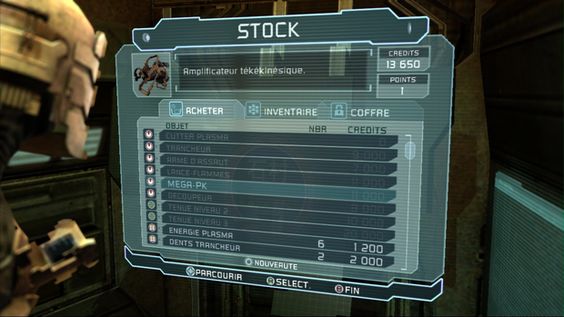
Diegetic elements exist within the game’s narrative and behind the game’s fourth wall.
In-game characters can hear, see, and interact with diegetic elements because they adhere to the context of the game’s narrative. If you design diegetic elements correctly, they can help to immerse your players in your games.
Classic examples of diegetic game elements include things like speedometers and holograms. Think of the holographic interface from Dead Space – that is a diegetic element.
Non-Diegetic Elements
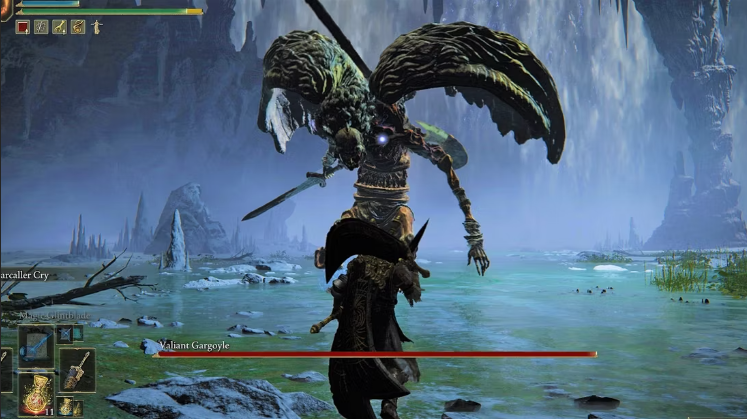
In contrast, you also have non-diegetic elements that exist beyond the scope of the game’s narrative and fourth wall.
Put differently, only the player can see, hear, and interact with non-diegetic elements because they don’t influence the narrative.
Although non-diegetic elements have no place in the game’s world or story, they are incredibly important. Designers often use them to communicate need-to-know information that improves the game’s playability.
Examples of non-diegetic elements include the health bars players can see in Elden Ring. It’s also worth noting that quest windows, point tables, and menu screens are also non-diegetic elements.
Spatial Elements
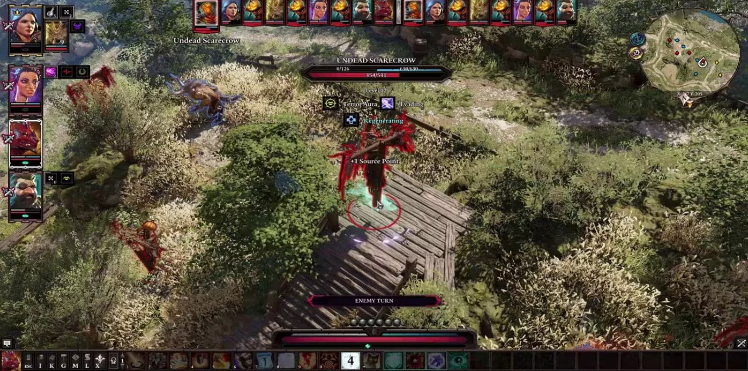
While spatial elements do exist in the game’s world, they don’t have any place in the game’s narrative.
Spatial elements are visible to the player and not the in-game characters. For that reason, spatial elements often appear in the form of visual aids with the purpose of enhancing playability.
As visual aids, spatial elements often help players complete the next action, find an in-game location, or select an object.
A classic example of a spatial element is the red enemy outlines in Divinity: Original Sin II. The characters can’t see this outline, but because of its red colors, players know that a particular character is hostile.
Other examples include arrows that indicate where a thrown object will land.
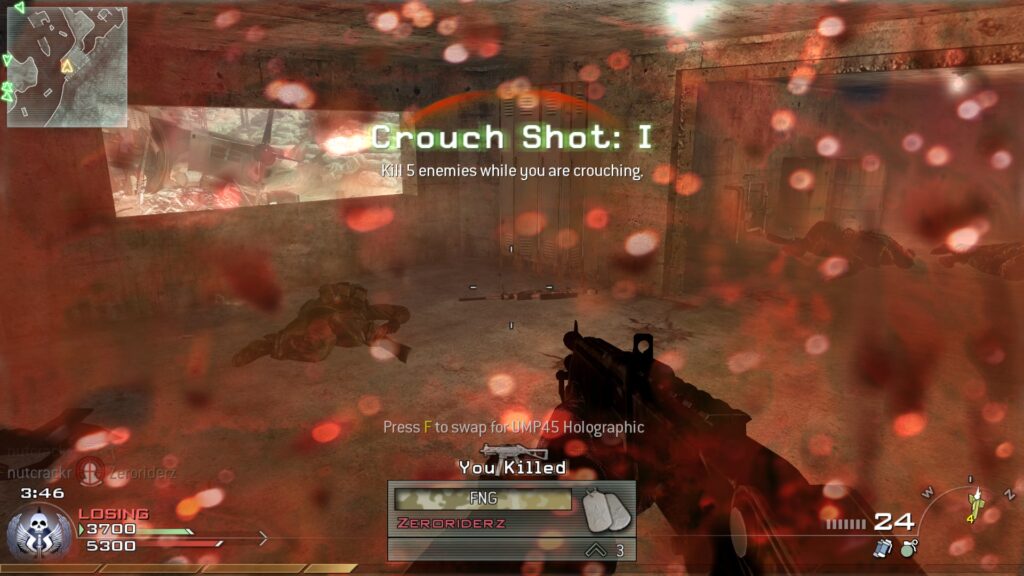
Meta Elements
Meta elements are the opposite of spatial elements – they exist in the game’s narrative but not its world.
The simplest way to understand meta elements is to consider games where your in-game characters can take damage. Take games like Call of Duty: Modern Warfare 2, for instance. That game indicates that a character’s health is low by covering the entire screen in a red, blood-like overlay.
Any other blurred, dirt-covered, or cracked overlays that indicate a character’s health/state are also meta elements.
How To Design Game UI
Now that you know more about game UI elements, we can now focus on the actual design process.
Below, we’ve revealed how to design game UI effectively.
1. Understanding the Game’s Narrative & Audience
The first step involves thinking like a UX researcher to understand and empathize with your target players.
Identify your target players and familiarize yourself with their preferences and expectations of the game’s genre. This will increase player engagement and allow for intuitive playing experiences.
You then need to learn about the game’s narrative and how the user interface adapts as the story progresses. This will help you determine the elements you need to communicate the appropriate mood and atmosphere.
2. Clarifying Key Features & Gameplay Mechanics
With the insights from your user research and your knowledge of the game’s story, you can begin defining essential elements.
With your design team, brainstorm and list the UI elements your game needs to be playable. For instance, if you’re creating an action/adventure game, you may want to add health bars and inventory menus.
Once you have listed all of the elements you need, you can focus on crucial user actions.

3. Mapping User Flows
At the end of the last step, you had started to think about the necessary actions for the user. These actions are the steps the player will need to take to progress through the game.
It’s now time to put those user actions into a user flow, complete with alternate paths, symbols, and labels.
This will help you visualize the player’s journey and how your UI elements will help them complete the said journey.
Tip: You may want to create screen wireframes along with your user flows to help your co-workers share your vision.

4. Creating the Game’s Visual Style
After establishing the foundation of your game’s UI, you can move on to the more visual side of UI design.
In other words, now is the time to create consistent and genre-appropriate color schemes, typographic elements, and iconography.
For instance, if you were designing fantasy games, you may want purple/black color schemes to represent magic and danger. You may also want a serif font with long flourishes.
Regardless of how you approach visual design, make sure it’s consistent and appropriate for the game’s narrative. Make sure to also apply your designs to the components you listed in Step 2.

5. Establishing Visual Hierarchy
Focussing on the key features you brainstormed in Step 2, you now have use them to establish a visual hierarchy.
Group related visual elements together logically and make sure players can easily access them on the screen.
You may also want to use size to emphasize more important elements that the player needs to know about.
6. Prototyping & Testing
You need to create interactive prototypes of your user interfaces, just as you would during the UX design process.
Test these prototypes with real users, garner valuable feedback, and iterate your designs accordingly.
7. Working With Game Development Tools
The next step is to select a game development tool that you can use to implement your user interfaces. Popular development tools include Unity and Unreal Engine.
Of course, there are many game development tools out there, which can make it hard to choose the right one. Keep in mind your game’s complexity, design requirements, and the expertise of your design team. This will help you find the ideal game development tool.
Tip: If players can access your game on multiple devices, make sure to prioritize responsive design, too.
8. Launching Your Game
After making any final improvements and conducting the last of your usability tests, you’re ready to launch your game!
But the work’s not over. After your launch, you’ll have copious amounts of player feedback. As you did before, you should iterate your designs based on this feedback and continuously improve/update your game’s UI.
Examples of Game UI Design To Learn From
Let’s take a look at a few examples of game UI design that embodies the process that we’ve just discussed.
Candy Crush
Candy Crush is a tile-matching video game that players can access on their iOS and Android devices.
While Candy Crush’s most compelling feature isn’t its story, there are plenty of visual elements from which to take inspiration. For instance, Candy Crush excels at fun, colorful, non-diegetic elements like its inventory menu.
Candy Crush’s inventory menu contains playful, cute icons that represent dessert-like boosters, lives, and in-game currency. Not only does this menu incentivize the player to collect items, but these UI elements also enhance playability.
What’s more, Candy Crush uses bubbly, handwritten-like fonts and bright, eye-catching colors. This consistent visual design helps players immerse themselves in the game’s fun, easy-going atmosphere.

Dead Space
We briefly mentioned Dead Space earlier, but since it’s a game that masters diegetic elements, it’s worth another mention.
Dead Space is a sci-fi survival horror that a player can enjoy on their PC, PlayStation, or Xbox.
What’s compelling about Dead Space is that virtually every interface the player sees, the character also sees. The game’s UIs appear as holograms that the protagonist’s space suit projects.
Thanks to Dead Space’s hyperfocus on diegetic elements, the player can enjoy a well-rounded, entirely immersive experience.
Beyond holograms, Dead Space’s designers also integrated health bars into the playable character’s suit. This is just another creative example of diegetic elements that immerse the player in the game’s world.
How To Become a Game UI Designer
Knowing what you know about game UI, you’re probably eager to learn how to become a game UI designer.
If this is the case, we’ve revealed the steps toward a rewarding career in the game UI industry below. Before you continue reading, however, it’s worth noting that there is no standardized way of becoming a game UI artist.
- Familiarize yourself with UI design principles, human-computer interaction, graphic design, and UX design.
- Analyze the UI of your favorite games and decide what works well and what doesn’t.
- Study standard gameplay mechanics, platforms, and genres.
- Practice with popular design tools like Figma, Sketch, and Adobe Photoshop. It’s also worth researching the UI-focused capabilities of game engines like Unity and Unreal Engine.
- Collaborate with and seek out feedback from UI design communities that specialize in game UI.
- Enrol in courses like ELVTR’s “UX/UI for Gaming” course.
- Utilize resources like books, blogs, podcasts, and YouTube videos that explain UI design for games, specifically.
- Participate in freelance projects to gain valuable practical experience.
- Build a portfolio or personal brand to host your work.
- Stay up to date with current game UI design trends.
- Practice, practice, practice!
FAQs
What are the key components of a game UI?
You can break down a game’s UI into six crucial components, which are as follows:
The narrative
The game’s world/the fourth wall
Diegetic elements
Non-diegetic elements
Spatial elements
Meta elements
Why is game UI design important?
Designing excellent game UI is important because, without it, players wouldn’t be able to enjoy an immersive playing experience.
By blending a game’s visuals, narrative, and gameplay mechanics, designers can establish the look and feel of the game’s world. This not only makes a game more enjoyable but also helps players navigate its space intuitively.
Is game UI copyrightable?
Generally speaking, a game’s UI is copyrightable, but copyright protection only applies to a game’s unique elements.
Common, reusable UI elements like pause buttons and health bars are not copyrightable. This is due to the fact that common UI elements are part of a universal visual language.
Game UI/UX Design: Final Thoughts
Hopefully, you feel more confident about tackling video game UI. Aside from immersion and playability, successful game UI relies on the same thing that every digital product does – user-centricity.
And there’s no better way to learn how to create user-centric products than by taking inspiration from already-successful ones. That’s where Page Flows comes in.
With Page Flows, you have access to a vast amount of user flow recordings, screenshots, and collected emails.
We document a wide range of essential user flows, including onboarding, purchasing and ordering, and general browsing. What’s more, we cover dozens upon dozens of industries and big-name brands like Disney, Spotify, and Amazon.
With our resources, you will never find yourself lacking solid user flow inspiration. Like game UI design, we’ll help you level up your skillset and become a proficient designer of must-have products.
Find out what it looks like to create masterful, user-centric user flows with Page Flows!